# Flutter E-Commerce App Template
<p align="center">
<img src="readme%20image/Build%20you%20shop%20app%20in%20days.png" alt="Build you shop app in days" style="width: 500px; height: auto;">
</p>
<p align="center">
The FlutterShop template makes it easier to develop an e-commerce app using Flutter. It includes all the necessary pages to build a shopping app for both Android and iOS using flutter.
</p>
<!-- Buttons -->
<p align="center">
<a href="https://cutt.ly/fefxdqE9" style="text-decoration: none;" target="_blank">
<img src="readme image/buy_now_btn.png" alt="Full template" style="margin-right: 32px; width: 170px; height: 50px;">
</a>
<a href="https://cutt.ly/1efxdynN" style="text-decoration: none;" target="_blank">
<img src="readme image/preview_btn.png" alt="Preview" style="width: 136px; height: 50px;">
</a>
</p>
<!-- Device image -->
</br >
</br >
<p align="center">
<img src="readme image/Device_frame.png" alt="Ecommerce app Home, product details page" style="width: 1100px; height: auto;">
</p>
</br >
</br >
This shop app template comes with 100+ screens. Some of these pages are Splash, Login, Signup, Home, Product, Search, Cart, Profile, Payment, Wallet, Order Tracking, and Order History. Additionally, all pages support both light and dark themes.You just need to connect the UI to your preferred backend, such as Firebase, WordPress, or your custom API. You can do anything you want with it.
<!-- Gif preview -->
</br >
</br >
<p align="center">
<img src="readme image/FlutterShop_Intro.gif" alt="Build you shop app in days" style="width: 643px; height: auto;">
</p>
</br >
</br >
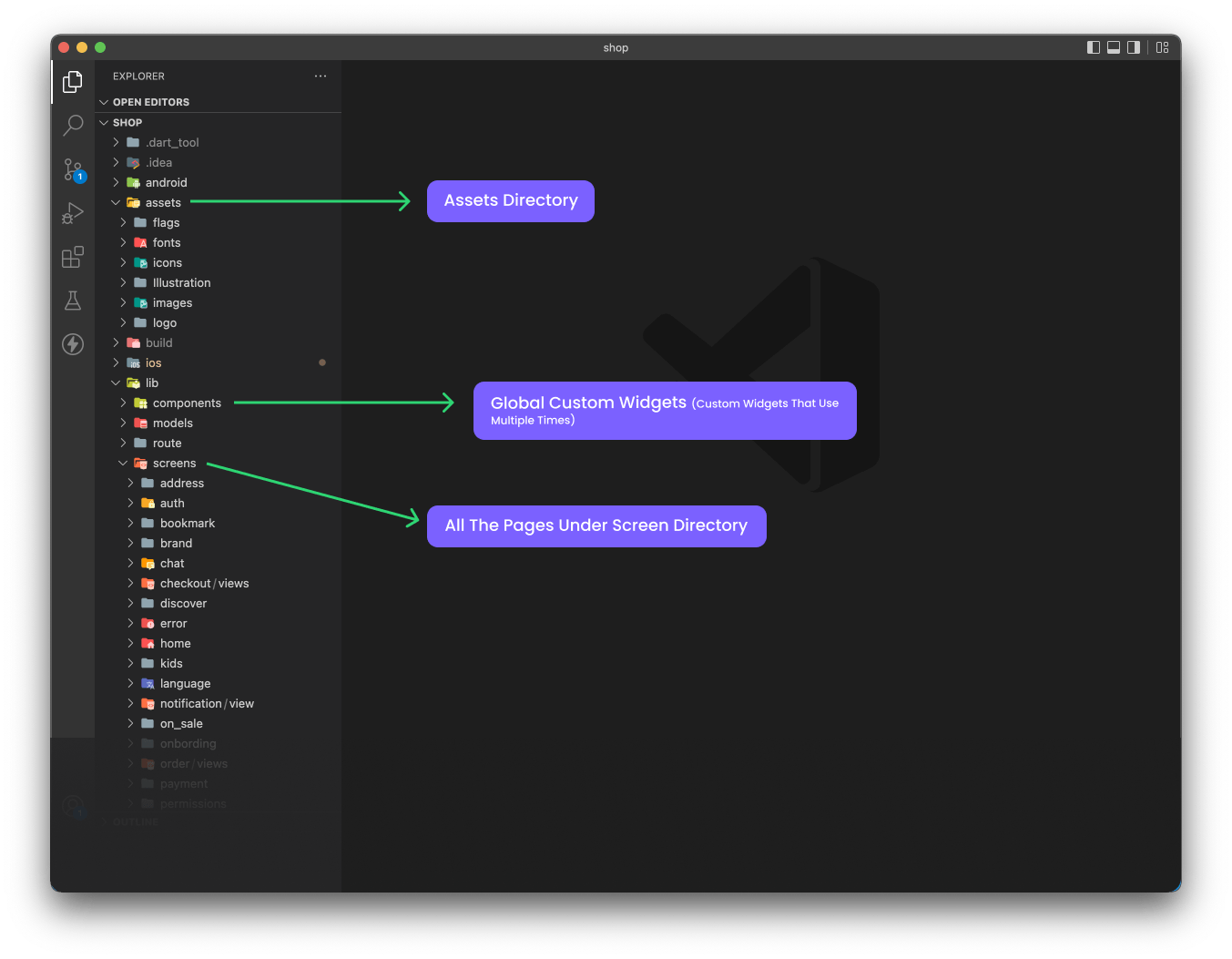
### Well organized project very easy to customize
<!-- Full preview -->
</br >
</br >
<p align="center">
<img src="https://public-files.gumroad.com/m3v3lyyipbzczcws5gcuhpbkmczk" alt="Build you shop app in days" style="width: 100%; height: auto;">
</p>
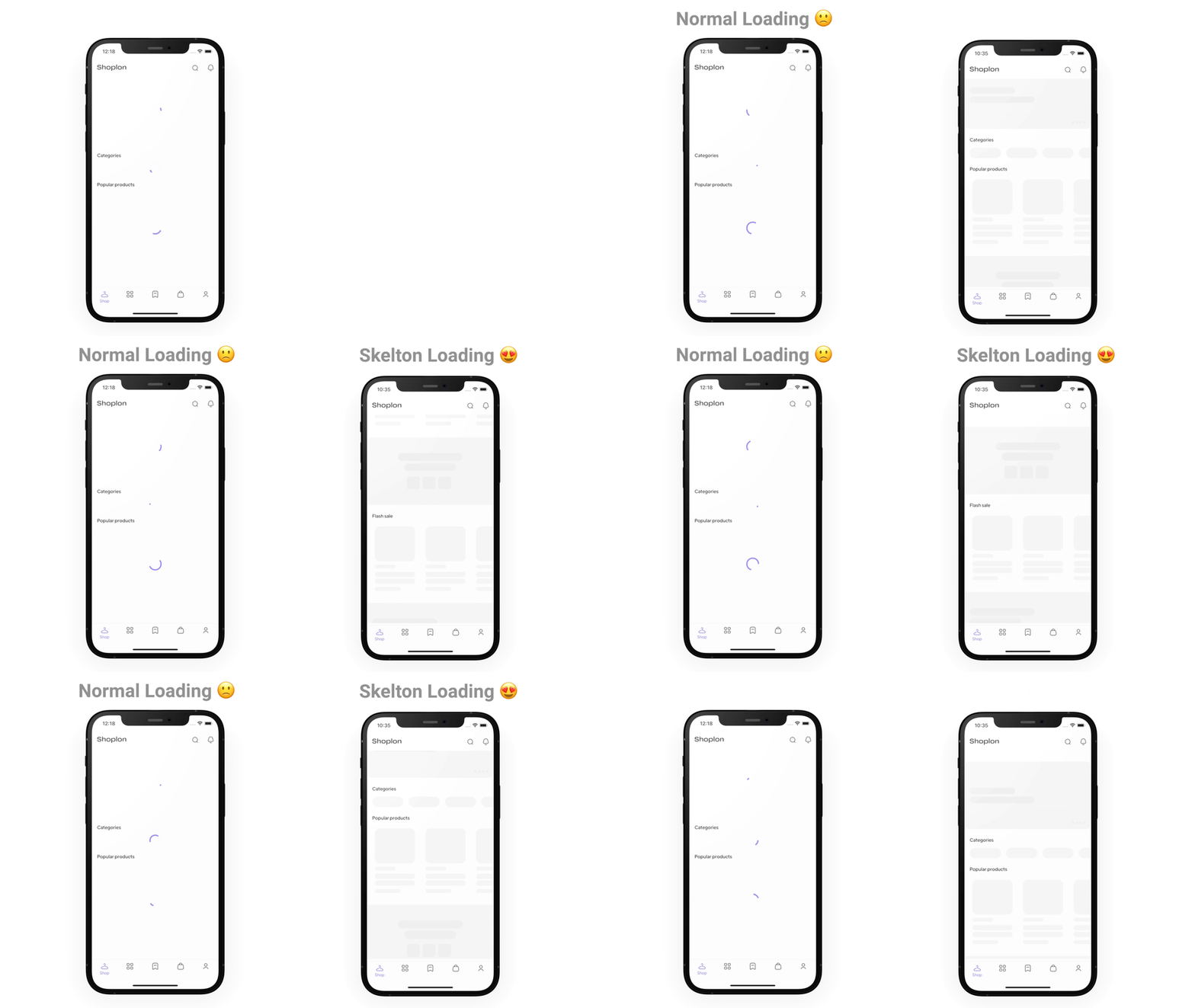
### Loading is no longer boring [New update V1.1] [Doc](https://abu-anwar.gitbook.io/fluttershop-doc/custom-loading)
The progress indicator that comes with Flutter, by default is okay in most places, but not in every place. Especially when you build an ecommerce app. This is why we have created a custom loading effect that boosts your user engagement even during the loading process. This kind of loading is common in popular apps like YouTube and LinkedIn. It's a small detail, but it makes a big difference.
## Screens on the FlutterShop E-commerce Template
As mentioned, this kit contains 100+ nicely crafted minimal screens that cover everything you need!👇
### Onboarding
- Onboarding Choose item
- Onboarding Add to cart
- Onboarding Pay online
- Onboarding Track order
- Onboarding Find store
- Notification permission
- Select language
### Authentication
- Log in
- Forgot password
- Choose verification method
- Verification code
- Set new password
- Done reset password
- Sign up
- Setup profile
- Verification code
- Successfully sign up
- Terms and conditions
- Enable fingerprint
- Enable face ID
### Product
- Product page
- Notify when available (Out of stock)
- Buy Now
- Product details
- Product reviews
- Add review
- Shipping methods
- Product return policy
- Product size guide
- Store Pickup Availability
- Added to cart message
- Product gallery (Will be added soon)
### Main Page
- Home page
- On sales page
- Kids product page
- Brand page
- Discover Page (Categories)
- Style 1
- Style 2 (Will be added soon)
- Style 3 (Will be added soon)
- Bookmark products page
### Search
- Recent search (Search history)
- Search suggestions
- Search filters
- Size filter
- Color filter
- Brand filter
- Price filter
- Sort by
- Search results
- Product not found
### Cart
- Products on Cart
- Empty cart
- Choose address
- Review & payment
- Checkout / Payment method
- Select card
- Pay with cash
- Use credit
- Thanks for order
- Add new card
- Scan card (Will be added soon)
### Profile
- Account
- Normal version
- Pro version
- Profile
- Edit profile
- Notifications
- Empty notification
- Enable notification
- Notification options
- Select Language
- Addresses
- Empty address
- Add new address
- Add number
- Verification code
- Selected location
- Payment
- Cards
- Empty payment
- Wallet
- Empty Wallet
- Wallet history
- Help & Chat (Support)
- Chat
- Preferences
### Order
- Account Orders
- Processing orders
- Cancel order
- Canceled orders
- Delivered orders
- Return orders (Will be added soon)
- More screens added in that sector soon
### Return & Request (Will be added soon)
- Return order list
- Empty return order
- Return order
- Return detail
### Error & Permission
- Notification permission
- No notification
- Select language
- No internet
- Server error
- Location permissions
- No search result
- Empty order list
- No Address found
- Empty payment
- Empty wallet
and MORE!!!! 🤩
If you want to learn how to build ecommerce template on Flutter [watch the playlist on YouTube](https://youtube.com/playlist?list=PLxUBb2A_UUy8OlaNZpS2mfL8xpHcnd_Af), In the first video, we start by making a neat onboarding screen for our shopping app. This works on both Android and iOS because it's made with Flutter. In the next video, we tackle the 'Sign In' and 'Forgot Password' screens, adding some unique error messages. The third video covers the 'Sign Up' and OTP processes. The fourth one is fun – we create the main homepage. In the fifth, we dive into the product page, and in the sixth, we craft an order page with cool features like 'swipe to delete.' Finally, in the seventh video, we design the user profile page.
Visit FlutterLibrary.com to Download the [Flutter e-commerce app template](https://www.flutterlibrary.com/templates/e-commerce-app) & other templates, and components.
</br >
</br >
<!-- Buttons -->
<p align="center">
<a href="https://app.gumroad.com/checkout?product=uxznc&option=B3wWhE6QH46cfm31C7jEmQ%3D%3D&quantity=1&referrer=https://github.com" style="text-decoration: none;" target="_blank">
<img src="readme image/buy_now_btn.png" alt="Full template" style="margin-right: 32px; width: 170px; height: 50px;">
</a>
</p>
