项目 / aimeos/aimeos-typo3
TYPO3 e-commerce extension for ultra fast online shops, scalable marketplaces, complex B2B applications and #gigacommerce
本站整理,非 GitHub 官方 description。
官方快照(gh_history.db,2026-11-25):总榜 未进 Top50 · 日榜 未进 Top50 · 周榜未满 7 天基线(官方不生成) · 月榜暂无官方口径;下方四卡为站内趋势聚合(周卡按上榜次数,非官方 7 日增量窗)。
以下三段按该项目自己的 GitHub README 章节摘录(可合理截断并标明);README 没有对应章节的留空,不编造。
安装 Aimeos TYPO3 扩展时,在 TYPO3 基础发行版中用 composer req -W aimeos/aimeos-typo3:~25.10 安装指定版本。
可用 Composer 安装;传统 TYPO3 安装也可通过 TER 添加扩展。源文写明本文档面向 25.10 及之后版本,其中稳定版 26.04 支持 TYPO3 13/14 LTS,LTS 版 25.10 支持 TYPO3 12/13 LTS。新站点还可选用带演示数据的 Aimeos 发行版。安装后需完成数据库更新并导入页面树。介绍页见 [Aimeos TYPO3](https://aimeos.org/TYPO3)。
来自 GitHub 仓库 README / 主页介绍正文,原样摘录,共 9,056 字节。
<a href="https://aimeos.org/">
<img src="https://aimeos.org/images/logo.png" alt="Aimeos logo" title="Aimeos" align="right" height="60" />
</a>
# Aimeos TYPO3 extension
[](https://packagist.org/packages/aimeos/aimeos-typo3)
[](https://scrutinizer-ci.com/g/aimeos/aimeos-typo3/?branch=master)
[](https://packagist.org/packages/aimeos/aimeos-typo3)
:star: Star us on GitHub — it motivates us a lot!
[Aimeos](https://aimeos.org/TYPO3) is THE professional, full-featured and
high performance e-commerce extension for TYPO3! You can install it in your
existing TYPO3 web site within 5 minutes and can adapt, extend, overwrite
and customize anything to your needs.

## Table Of Contents
- [Installation](#installation)
- [Composer](#composer)
- [DDev or Colima](#ddev)
- [TER](#ter-extension)
- [TYPO3 setup](#typo3-setup)
- [Database setup](#database-setup)
- [Security](#security)
- [Page setup](#page-setup)
- [Download the Aimeos Page Tree file](#download-the-aimeos-page-tree-file)
- [Go to the Import View](#go-to-the-import-view)
- [Upload the page tree file](#upload-the-page-tree-file)
- [Go to the import view](#go-to-the-import-view)
- [Import the page tree](#import-the-page-tree)
- [SEO-friendly URLs](#seo-friendly-urls)
- [License](#license)
- [Links](#links)
## Installation
This document is for the latest Aimeos TYPO3 **25.10 release and later**.
- Stable release: 26.04 (TYPO3 13/14 LTS)
- LTS release: 25.10 (TYPO3 12/13 LTS)
### Composer
**Note:** composer 2.2+ is required!
The latest TYPO3 version can be installed via composer. This is especially useful, if you want to create new TYPO3 installations automatically or play with the latest code. You need to install the composer package first, if it isn't already available:
```bash
php -r "readfile('https://getcomposer.org/installer');" | php -- --filename=composer
```
To install the TYPO3 base distribution first, execute this command:
```bash
composer create-project typo3/cms-base-distribution myshop
# or install a specific TYPO3 version:
composer create-project "typo3/cms-base-distribution:^13" myshop
```
It will install TYPO3 into the `./myshop/` directory. Change into the directory and install TYPO3 using:
```bash
./vendor/bin/typo3 setup
```
Open the TYPO3 URL in your browser and follow the setup steps. Afterwards, install the Aimeos extension using:
```bash
composer req -W aimeos/aimeos-typo3:~25.10
```
If composer complains that one or more packages can't be installed because the required minimum stability isn't met, add this to your `composer.json`:
```json
"minimum-stability": "dev",
"prefer-stable": true,
```
If you want a more or less working installation out of the box for new installations, you can install the Bootstrap package too:
```bash
composer req bk2k/bootstrap-package
```
***Note***: Remember to create a root page and a root template, which includes the Bootstrap package templates! (See also below.)
Finally, depending on your TYPO3 version, run the following commands from your installation directory:
```bash
php ./vendor/bin/typo3 extension:setup
php ./vendor/bin/typo3 aimeos:setup --option=setup/default/demo:1
```
If you don't want to add the Aimeos demo data, you should remove `--option=setup/default/demo:1` from the Aimeos setup command.
If you experience any errors with the database, please check the [Database Setup](#database-setup) section below.
### DDev
*Note:* Installation instructions for TYPO3 with `ddev` or `Colima` can be found here:
[TYPO3 with ddev or colima](https://ddev.readthedocs.io/en/latest/users/quickstart/)
### TER Extension
If you want to install Aimeos into a traditionally installed TYPO3 ("legacy installation"), the [Aimeos extension from the TER](https://typo3.org/extensions/repository/view/aimeos) is recommended. You can download and install it directly from the Extension Manager of your TYPO3 instance.
* Log into the TYPO3 backend
* Click on "Admin Tools::Extensions" in the left navigation
* Click the icon with the little plus sign left from the Aimeos list entry

Afterwards, you have to execute the update script of the extension to create the required database structure:
* Click on "Admin Tools::Upgrade"
* Click "Run Upgrade Wizard" in the "Upgrade Wizard" tile
* Click "Execute"

#### Aimeos Distribution
For new TYPO3 installations, there is a 1-click [Aimeos distribution](https://typo3.org/extensions/repository/view/aimeos_dist) available, too. Choose the Aimeos distribution from the list of available distributions in the Extension Manager and you will get a completely set up shop system including demo data for a quick start.
## TYPO3 Setup
### Security
Since **TYPO3 9.5.14+** implements **SameSite cookie handling** and restricts when browsers send cookies to your site. This is a problem when customers are redirected from external payment provider domain. Then, there's no session available on the confirmation page. To circumvent that problem, you need to set the configuration option `cookieSameSite` to `None` in your `./typo3conf/LocalConfiguration.php` or `./config/system/settings.php`:
```php
'FE' => [
'cookieSameSite' => 'None'
]
```
## Site Setup
TYPO3 10+ requires a site configuration which you have to add in "Site Management" > "Sites" available in the left navigation. When creating a root page (a page with a globe icon), a basic site configuration is automatically created (see below at [Go to the Import View](#go-to-the-import-view)).
## Page Setup
### Download the Aimeos Page Tree file
The page setup for an Aimeos web shop is easy, if you import the example page tree for TYPO3 10/11. You can download the version you need from here:
* [25.10+ page tree](https://aimeos.org/fileadmin/download/Aimeos-pages_2026.04.xml) and later
* [24.10 page tree](https://aimeos.org/fileadmin/download/Aimeos-pages_2024.10-2.t3d)
**Note:** The Aimeos layout expects [Bootstrap](https://getbootstrap.com) providing the grid layout!
In order to upload and install the file, follow the following steps:
### Go to the Import View
**Note:** It is recommended to import the Aimeos page tree to a page that is defined as "root page". To create a root page, simply create a new page and, in the "Edit page properties", activate the "Use as Root Page" option under "Behaviour". The icon of the root page will change to a globe. This will also create a basic site configuration. Don't forget to also create a typoscript root template and include the bootstrap templates with it!
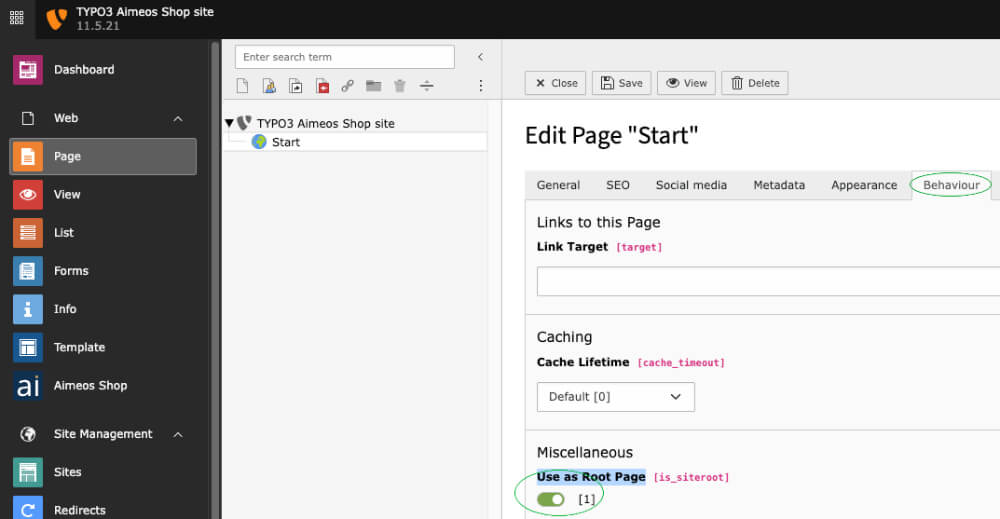
* In "Web::Page", right-click on the root page (the one with the globe)
* Click on "More options..."
* Click on "Import"

### Upload the page tree file
* In the page import dialog
* Select the "Upload" tab (2nd one)
* Click on the "Select" dialog
* Choose the T3D file you've downloaded
* Press the "Upload files" button

### Import the page tree
* In Import / Export view
* Select the uploaded file from the drop-down menu
* Click on the "Preview" button
* The pages that will be imported are shown below
* Click on the "Import" button that has appeared
* Confirm to import the pages

Now you have a new page "Shop" in your page tree including all required sub-pages.
### SEO-friendly URLs
TYPO3 9.5 and later can create SEO friendly URLs if you add the rules to the site config:
[https://aimeos.org/docs/latest/typo3/setup/#seo-urls](https://aimeos.org/docs/latest/typo3/setup/#seo-urls)
## License
The Aimeos TYPO3 extension is licensed under the terms of the GPL Open Source
license and is available for free.
## Links
* [Web site](https://aimeos.org/integrations/typo3-shop-extension/)
* [Documentation](https://aimeos.org/docs/TYPO3)
* [Forum](https://aimeos.org/help/typo3-extension-f16/)
* [Issue tracker](https://github.com/aimeos/aimeos-typo3/issues)
* [Source code](https://github.com/aimeos/aimeos-typo3)
