项目 / atilaahmettaner/tradingview-mcp
MCP server for market analysis in AI assistants: screeners, multi-timeframe technical analysis, backtests and sentiment for crypto, stocks, forex and futures. 39 tools. Self-host free, or use the hosted version, TradingMCP.
本站整理,非 GitHub 官方 description。
官方快照(gh_history.db,2026-11-25):总榜 未进 Top50 · 日榜 未进 Top50 · 周榜未满 7 天基线(官方不生成) · 月榜暂无官方口径;下方四卡为站内趋势聚合(周卡按上榜次数,非官方 7 日增量窗)。
以下三段按该项目自己的 GitHub README 章节摘录(可合理截断并标明);README 没有对应章节的留空,不编造。
该服务器提供39个工具,可零配置地在Claude、Cursor或Grok中添加远程连接地址使用,ChatGPT、Copilot等客户端可用私有链接,付费方案每月9美元起。
该项目把 7 个高流量工具改为 async 提升并发,回测策略扩至 9 个并由 compare_strategies 排序,还 TradingView 量子筛选器加了自动重试和 60 秒 TTL 缓存以消除瞬时解析错误。
来自 GitHub 仓库 README / 主页介绍正文,正文较长,已截断:保留前 20000 字符(原始 35,082 字节),完整内容见 GitHub 仓库。
<!-- mcp-name: io.github.atilaahmettaner/tradingview-mcp -->
# TradingView MCP Market Data & Technical Analysis for AI Assistants
<p align="center">
<a href="https://github.com/atilaahmettaner/tradingview-mcp/blob/main/assets/tradingmcp-film-15.mp4"><img src="https://raw.githubusercontent.com/atilaahmettaner/tradingview-mcp/main/assets/tradingmcp-film-15.webp" width="820" alt="15-second product film: an AI is asked 'What did the market do today?', a live market board assembles, Ethereum is marked as the day's top mover and its daily chart with Bollinger Bands is drawn in the chat — TradingMCP, the hosted version of this server" /></a>
<br>
<sub>15 seconds, real output (market data as of 13 Oct 2026) · this server, hosted as <a href="https://tradingmcp.ai/?utm_source=github&utm_medium=readme&utm_content=film">TradingMCP</a> · <a href="https://github.com/atilaahmettaner/tradingview-mcp/blob/main/assets/tradingmcp-film-15.mp4">watch in full quality</a></sub>
</p>
<a href="https://trendshift.io/repositories/25110" target="_blank"><img src="https://trendshift.io/api/badge/repositories/25110" alt="atilaahmettaner%2Ftradingview-mcp | Trendshift" style="width: 250px; height: 55px;" width="250" height="55"/></a>
**TradingView MCP server** — real-time market data, technical indicators, screeners, and backtesting for Claude, ChatGPT, Cursor, Copilot, and any MCP client. Stocks, crypto, forex & futures across global exchanges.
Backtesting + live sentiment + Yahoo Finance + 39 technical-analysis tools — the most complete TradingView MCP toolkit, all in one server.
**Don't want to install anything?** [TradingMCP](https://tradingmcp.ai/?utm_source=github&utm_medium=readme&utm_content=top_cta), the hosted version of this server, gives you all 39 tools in your AI app. In Claude, Cursor or Grok, add `https://mcp.tradingmcp.ai/mcp` as a connector and sign in: no key to paste. ChatGPT, Copilot and other MCP clients connect with a private link. From $9/mo with a 14-day money-back guarantee; self-hosting stays free.
<p align="center">
<a href="https://claude.ai/customize/connectors?modal=add-custom-connector&connectorName=TradingMCP&connectorUrl=https%3A%2F%2Fmcp.tradingmcp.ai%2Fmcp"><img src="https://img.shields.io/badge/Add_to-Claude-D97757?style=for-the-badge&logo=claude&logoColor=white" alt="Add TradingMCP to Claude" height="32"></a>
<a href="https://tradingmcp.ai/connect?utm_source=github&utm_medium=readme&utm_content=add_to_cursor#cursor"><img src="https://img.shields.io/badge/Add_to-Cursor-1d1e1b?style=for-the-badge&logo=cursor&logoColor=white" alt="Add TradingMCP to Cursor" height="32"></a>
<br>
<b>Starts at $9/month, 14-day money-back guarantee.</b>
<br>
<sub>One click opens Claude's connector dialog with TradingMCP filled in; sign in with the email you subscribe with. Other apps: <a href="https://tradingmcp.ai/connect?utm_source=github&utm_medium=readme&utm_content=connect_other">tradingmcp.ai/connect</a></sub>
</p>
**Sponsor:** [Whop](https://whop.com/start/?code=TVMCP&utm_source=majoragv&utm_medium=sponsor&utm_campaign=tvmcp): sell your courses, software and communities online.
**[Morning market brief in one prompt](https://tradingmcp.ai/?utm_source=github&utm_medium=readme&utm_content=brief):** ask "give me this morning's market brief" and get global indices, futures, the Bitcoin pulse and the hosted Markets panel in one answer. Charts are drawn right in the chat (demo below). In Grok Bot, [add the Market Brief bot](https://x.ai/bot/7KuzDNTqOKomzcZirrvdz) to get one on weekday mornings.
<p align="center">
<img src="https://raw.githubusercontent.com/atilaahmettaner/tradingview-mcp/main/.github/assets/tradingview-mcp-demo.gif" width="820" alt="TradingView MCP in an AI chat: ask for the top gainers on Binance and get ranked, real-time results — one of 39 tools" />
</p>
**🆕 The [hosted version (TradingMCP)](https://tradingmcp.ai/?utm_source=github&utm_medium=readme&utm_content=charts) now draws.** Ask for a chart and an interactive candlestick view (1d / 1h / 15m, optional Bollinger overlay) renders live **inside the conversation** via MCP Apps — and the AI reads the band values back to you:
<p align="center">
<img src="https://raw.githubusercontent.com/atilaahmettaner/tradingview-mcp/main/docs/assets/bollinger-15m-chart-demo.gif" width="820" alt="MCP Apps demo: asking Claude for a 15-minute Bollinger chart — an interactive candlestick chart with Bollinger Bands renders inside the conversation and Claude analyzes the band values" />
</p>
**[Add one URL and sign in](https://tradingmcp.ai/?utm_source=github&utm_medium=readme&utm_content=paste_url) (or `pip install`), then just ask.** Real output, straight from the live server:
<p align="center">
<img src="https://raw.githubusercontent.com/atilaahmettaner/tradingview-mcp/main/assets/showcase-top-gainers.png" width="820" alt="Real output: top crypto gainers on KuCoin with 24h change, RSI and signal — ranked table returned in chat" />
</p>
<p align="center">
<img src="https://raw.githubusercontent.com/atilaahmettaner/tradingview-mcp/main/assets/showcase-gold-mtf.png" width="820" alt="Real output: multi-timeframe gold analysis — weekly to 15m trend alignment with a LEAN BULLISH verdict" />
</p>
**Try these first** — they work in Claude, ChatGPT, Cursor, or any MCP client:
```text
Show today's top crypto gainers on Binance
Run a full technical analysis of NVDA
What's the multi-timeframe read on gold?
Backtest an RSI strategy on BTC on the daily timeframe
```
> [!NOTE]
> Independent open-source project — **not affiliated with, endorsed by, or associated with TradingView Inc.** "TradingView" is a trademark of its respective owner; this project consumes third-party market data and is not a TradingView product.
> [!NOTE]
> **Does it need — or risk — your TradingView account? No.** This server does **not** log into, scrape, or automate a TradingView session, and it requires no TradingView account or API key. Market data is fetched server-side from public endpoints, so there is no account of yours in the loop and no browser/UI automation. *(This is different from MCP servers that drive the TradingView Desktop app via Chrome DevTools.)* You are responsible for ensuring your own use complies with the terms of any data source you point it at.
<details>
<summary><b>How this compares to desktop-automation TradingView MCPs</b> (the ones that remote-control TradingView Desktop)</summary>
<br>
"TradingView MCP" now means two very different kinds of project. Both are useful — for different jobs:
| | **This project — data & analysis API** | **Desktop-automation MCPs** |
|---|---|---|
| What you need | Nothing — public market data | TradingView Desktop, usually with a paid TradingView plan |
| Where it works | Claude.ai, Claude Code, ChatGPT, Cursor, Copilot — any MCP client | Mostly Claude Code, on your own machine |
| When your machine is off | Hosted version keeps answering, 24/7 | Stops |
| Screeners & backtesting | Built in (39 tools, multi-exchange) | Whatever the TradingView UI offers |
| Charts | Interactive in-conversation charts (MCP Apps, hosted) | TradingView's own charts |
| Your TradingView account | Not needed, never touched | Drives your logged-in session |
If you want an AI clicking around *your* TradingView Desktop — editing Pine Script, drawing on charts, using replay — check out [tradesdontlie/tradingview-mcp](https://github.com/tradesdontlie/tradingview-mcp). If you want headless market data, screeners and backtesting available to any AI client, with nothing installed and no TradingView account in the loop — that's this project.
</details>
> [!IMPORTANT]
> **Not financial advice.** Nothing produced by this software is investment, financial, legal, tax, or accounting advice. tradingview-mcp is an informational and educational analysis tool. Its outputs, including indicators, scores, signals, "trade setups", entries, stop losses, and targets, are computed from third party market data and are **not** recommendations to buy, sell, or hold any asset. It does not execute trades, manage money, or guarantee any result. Trading and investing carry a substantial risk of loss, and you can lose some or all of your capital. Always do your own research and consult a licensed professional before making any financial decision. You are solely responsible for your own decisions and for complying with the laws and regulations that apply to you. Market data may be delayed, inaccurate, or incomplete, and is provided without warranty.
> [!TIP]
> **Prefer zero setup? Use the hosted version.** [**TradingMCP**](https://tradingmcp.ai/?utm_source=github&utm_medium=readme&utm_content=tip) serves all 39 tools in Claude, ChatGPT, Cursor, Grok and Copilot — no `uv`, `pandas`, or Python to wrangle, and in Claude, Cursor and Grok you just sign in instead of pasting a key. **From $9/mo (Pro) or $29/mo (Pro+ — higher limits), with a 14-day money-back guarantee.** Self-hosting stays free forever; hosted is just for folks who'd rather skip the ops. *(Full self-host vs hosted comparison in Quick Start below.)*
[](https://opensource.org/licenses/MIT)
[](https://www.python.org/downloads/)
[](https://modelcontextprotocol.com/)
[](https://openclaw.ai)
[](https://github.com/atilaahmettaner/tradingview-mcp/releases)
[](https://pypi.org/project/tradingview-mcp-server/)
[](https://github.com/sponsors/atilaahmettaner)
> **⭐ If this tool improves your workflow, please star the repo and consider [sponsoring](https://github.com/sponsors/atilaahmettaner) — it keeps the project alive and growing!**
<a href="https://github.com/sponsors/atilaahmettaner">
<img src="https://img.shields.io/badge/☕_Coffee_($5)-Sponsor-orange?style=for-the-badge&logo=github-sponsors" alt="Sponsor $5"/>
</a>
<a href="https://github.com/sponsors/atilaahmettaner">
<img src="https://img.shields.io/badge/🚀_Supporter_($15)-Sponsor-blueviolet?style=for-the-badge&logo=github-sponsors" alt="Sponsor $15"/>
</a>
<a href="https://github.com/sponsors/atilaahmettaner">
<img src="https://img.shields.io/badge/💎_Pro_($30)-Sponsor-gold?style=for-the-badge&logo=github-sponsors" alt="Sponsor $30"/>
</a>
---
## 🎥 Framework Demo
https://github-production-user-asset-6210df.s3.amazonaws.com/67838093/478689497-4a605d98-43e8-49a6-8d3a-559315f6c01d.mp4
---
## 🆕 What's New
**Stability & Strategy Expansion (May 2026)**
- **Async hot-path tools** — 7 high-traffic tools (`yahoo_price`, `stock_extended_hours`, `top_gainers`, `volume_breakout_scanner`, `multi_timeframe_analysis`, `financial_news`, `combined_analysis`) converted to `async def`. FastMCP runs sync tools serialized on the event loop — async unlocks real intra-server parallelism so concurrent tool calls actually overlap. `combined_analysis` additionally fans its 3 sub-calls out via `asyncio.gather` for ~3× wall-clock improvement on the power tool. `yahoo_price` / `stock_extended_hours` use `httpx.AsyncClient` for true non-blocking I/O; sync-library tools (`tradingview_ta`, `tradingview-screener`, `feedparser`) are off-loaded via `asyncio.to_thread`. *(PR — open)*
- **9 backtest strategies** (up from 6) — added `rsi_pullback`, `keltner_breakout`, and `triple_ema`, covering trend-pullback, ATR-normalized breakout, and SMA200-filtered EMA cross edges. `compare_strategies` now ranks the full 9.
- **Resilience layer** — automatic retry + 60-second TTL cache on the TradingView screener provider, eliminating transient `"Expecting value"` errors on `combined_analysis` and `multi_timeframe_analysis`. *(PR [#32](https://github.com/atilaahmettaner/tradingview-mcp/pull/32) — merged)*
- **Financial news service rebuild** — replaces deprecated Reuters RSS endpoints with Yahoo Finance, MarketWatch, and CNBC. Fixes the long-standing `count: 0` bug on `financial_news`. *(PR [#33](https://github.com/atilaahmettaner/tradingview-mcp/pull/33) — merged)*
- **TA throttle** — caps concurrent `tradingview_ta` calls (default 4) + min 0.8s spacing between starts. Prevents parallel bursts of `combined_analysis` / `multi_timeframe_analysis` from hitting TradingView's empty-body rate-limit cliff. Tunable via env vars. *(PR [#34](https://github.com/atilaahmettaner/tradingview-mcp/pull/34) — merged)*
- **Walk-forward backtesting** (`walk_forward_backtest_strategy`) — train/test split with overfitting verdict (ROBUST / MODERATE / WEAK / OVERFITTED).
- **Hourly (1h) timeframe** support across `backtest_strategy`, `compare_strategies`, and `walk_forward_backtest_strategy`.
- **Full trade log + equity curve** outputs (`include_trade_log=True`, `include_equity_curve=True`).
---
## 🏗️ Architecture
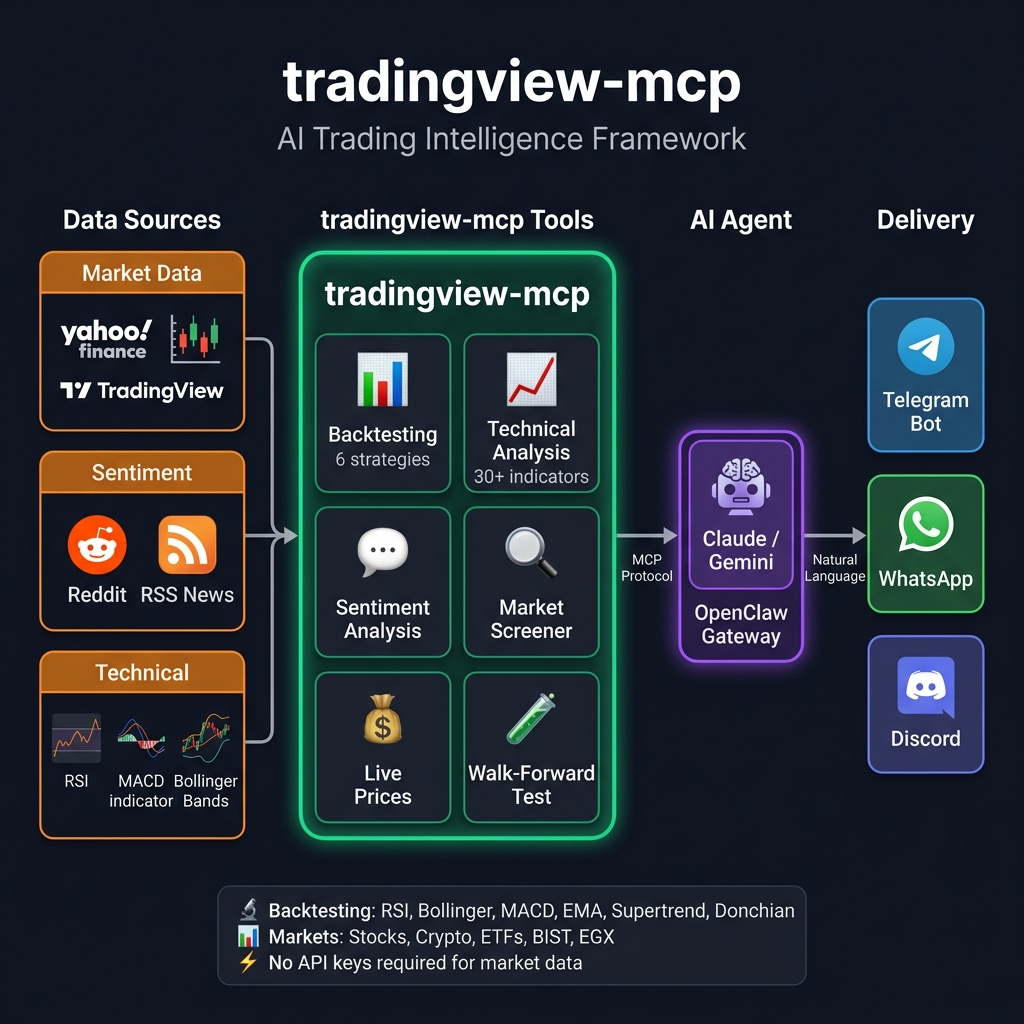
---
## ✨ Why tradingview-mcp?
| Feature | `tradingview-mcp` | Traditional Setups | Bloomberg Terminal |
|---------|-------------------|--------------------|--------------------|
| **Setup Time** | 5 minutes | Hours (Docker, Conda...) | Weeks (Contracts) |
| **Cost** | Free & Open Source | Variable | $30k+/year |
| **Backtesting** | ✅ 9 strategies + Walk-forward + Sharpe | ❌ Manual scripting | ✅ Proprietary |
| **News & Sentiment** | ✅ Licensed news + per-ticker sentiment (Marketaux) | ❌ Separate setup | ✅ Terminal |
| **Market Data** | ✅ Live / Real-Time | Historical / Delayed | Live |
| **API Keys** | **None required** | Multiple (OpenAI, etc.) | N/A |
---
> [!WARNING]
> **Security notice: impersonating copies of this repository.** This project is **Python-only** and has **no official npm / Node.js package**. The only official sources are this repository (`atilaahmettaner/tradingview-mcp`), the PyPI package [`tradingview-mcp-server`](https://pypi.org/project/tradingview-mcp-server/), and the hosted version, TradingMCP, at [tradingmcp.ai](https://tradingmcp.ai/?utm_source=github&utm_medium=readme&utm_content=security_notice) (formerly pro.cryptosieve.com).
>
> Copies of this repository published under other accounts add a `package.json` whose dependencies install malware through npm (for example `oracle-redis`, [MAL-2026-16390](https://osv.dev/vulnerability/MAL-2026-16390)). If you cloned a "tradingview-mcp" repository from another account and ran `npm install`, treat that machine as compromised. Thanks to @roberttidball for the report (#101).
## 🚀 Quick Start (5 Minutes)
**Two ways to run it — the same 39 tools either way:**
| | 🧑💻 Self-host (this repo) | ☁️ Hosted — [TradingMCP](https://tradingmcp.ai/?utm_source=github&utm_medium=readme&utm_content=quickstart_table) |
|---|---|---|
| **Price** | Free forever (MIT) | $9/mo Pro · $29/mo Pro+ · 14-day money-back guarantee |
| **Time to first call** | ~5 minutes (Python + `uv`) | ~60 seconds (add one URL, sign in) |
| **Updates & ops** | You run and update it | Managed — always on the latest |
| **Runs on** | Your machine or VPS | Hosted, streamed from the edge |
| **Limits** | Your hardware | 2,500/mo · 60/min (Pro) → 10,000/mo · 150/min (Pro+) |
| **Best for** | Tinkerers, forkers, full control | Folks who'd rather skip the ops |
> ☁️ **Zero setup:** add `https://mcp.tradingmcp.ai/mcp` as a connector in Claude, Cursor or Grok and sign in; ChatGPT, Copilot and other clients use your private link → **[get started with TradingMCP from $9/mo](https://tradingmcp.ai/?utm_source=github&utm_medium=readme&utm_content=quickstart_cta)** (14-day money-back guarantee) · [setup guide](https://tradingmcp.ai/docs?utm_source=github&utm_medium=readme&utm_content=quickstart_docs). Everything below is for self-hosting.
### Install via pip
```bash
pip install tradingview-mcp-server
```
### Optional: news & sentiment (free Marketaux key)
`financial_news` and `market_sentiment` (plus the news/sentiment parts of
`combined_analysis`) are powered by [Marketaux](https://www.marketaux.com/) —
licensed market news with per-entity sentiment. Grab a **free API key**
(100 requests/day; the server caches for 4h and shares one fetch between news
and sentiment, so the free tier goes a long way) and set:
```bash
export MARKETAUX_API_TOKEN=your_token_here # optional
```
Without a token those two tools return a friendly "not configured" note — all
other tools work normally.
### Claude Desktop Config (`claude_desktop_config.json`)
> **Note:** On macOS, GUI apps like Claude Desktop may not have `~/.local/bin` in their PATH. Use the full path to `uvx` to avoid "command not found" errors.
```json
{
"mcpServers": {
"tradingview": {
"command": "/Users/YOUR_USERNAME/.local/bin/uvx",
"args": ["--from", "tradingview-mcp-server", "tradingview-mcp"]
}
}
}
```
On Linux, replace `/Users/YOUR_USERNAME` with `/home/YOUR_USERNAME`. On Windows, use `%USERPROFILE%\.local\bin\uvx.exe`.
### Codex Plugin Config
This repository also includes mcp-only Codex plugin metadata:
- `.codex-plugin/plugin.json`
- `.codex-mcp.json`
The plugin uses the same PyPI package entrypoint:
```json
{
"mcpServers": {
"tradingview": {
"command": "uvx",
"args": ["--from", "tradingview-mcp-server", "tradingview-mcp"]
}
}
}
```
After installing or enabling the Codex plugin, restart Codex so the MCP server is loaded in the next session. Depending on your Codex version, `codex mcp list` may show registered MCP servers, but tool availability should be verified in a fresh Codex session.
### Or run from source
```bash
git clone https://github.com/atilaahmettaner/tradingview-mcp
cd tradingview-mcp
uv run tradingview-mcp
```
<details>
<summary>How is the hosted version different from TradingView's official MCP?</summary>
<br>
TradingView launched its own MCP server in public beta on 16 Sep 2026. It is a good product, and for some jobs it is the better pick. Here is the honest difference (competitor facts checked Oct 2026 against TradingView's own [MCP docs](https://www.tradingview.com/mcp/docs), [launch post](https://www.tradingview.com/blog/en/tradingview-mcp-server-public-beta-60864/) and [pricing page](https://www.tradingview.com/pricing/)):
1. **Analysis, not just data.** TradingMCP runs multi-timeframe analysis, walk-forward backtests, smart-money and volume scans, and draws interactive charts in the chat. TradingView's MCP returns data, screens and a single-timeframe technical rating; its tool list has no backtesting or chart rendering ([docs](https://www.tradingview.com/mcp/docs), checked Oct 2026).
2. **Morning market brief in one prompt.** Global market snapshot, futures overview, Bitcoin pulse and the Markets panel in a single answer.
3. **$9 all-in, nothing else to subscribe to.** TradingView's MCP is included only in paid TradingView plans, Essential and higher; trial plans don't include it ([docs](https://www.tradingview.com/mcp/docs), [pricing](https://www.tradingview.com/pricing/), checked Oct 2026). TradingMCP is $9/mo Pro or $29/mo Pro+ with a 14-day money-back guarantee, and self-hosting this repo stays free.
**Where TradingView's MCP wins:** fundamentals and analyst forecasts, SEC filings and earnings-call transcripts, editing your TradingView watchlists and alerts, and data that comes officially from TradingView itself ([docs](https://www.tradingview.com/mcp/docs), checked Oct 2026). If that is what you need, use theirs, or run both side by side.
[Try TradingMCP](https://tradingmcp.ai/?utm_source=github&utm_medium=readme&utm_content=vs_official) · works in Claude, ChatGPT, Cursor, Grok, Copilot or any MCP client.
</d