项目 / ever-co/ever-gauzy
Ever® Gauzy™ 开源企业管理平台(ERP/CRM/HRM/ATS/PM 一体化)。
本站整理,非 GitHub 官方 description。
官方快照(gh_history.db,2026-11-25):总榜 未进 Top50 · 日榜 未进 Top50 · 周榜未满 7 天基线(官方不生成) · 月榜暂无官方口径;下方四卡为站内趋势聚合(周卡按上榜次数,非官方 7 日增量窗)。
以下三段按该项目自己的 GitHub README 章节摘录(可合理截断并标明);README 没有对应章节的留空,不编造。
Gauzy 提供在线应用(app.gauzy.co),目前处于 Alpha 测试阶段,使用时需谨慎。
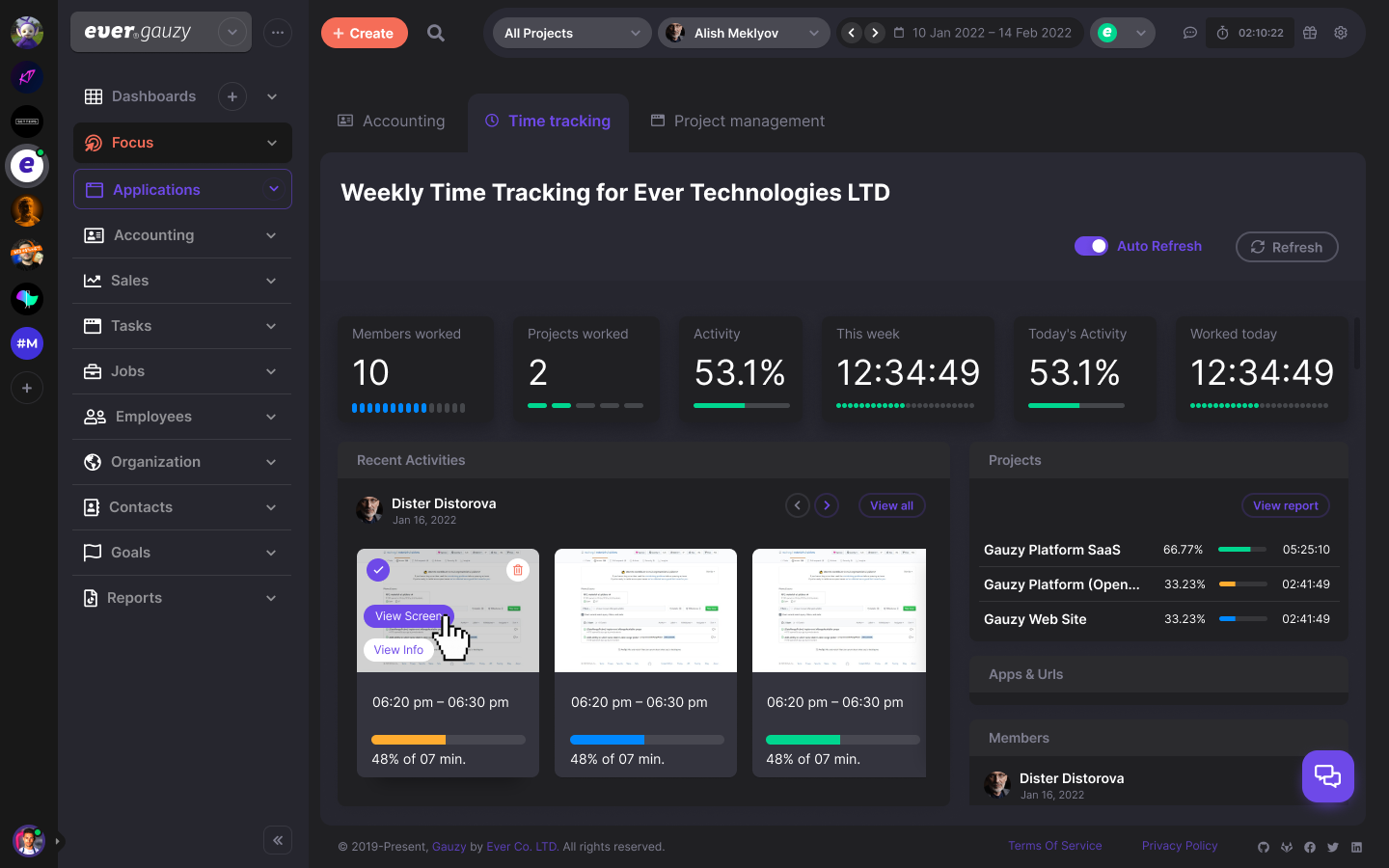
Ever Gauzy 集成了人力资源管理(含时间追踪与员工绩效监控)、CRM、ERP、项目任务管理、销售、财务与成本管理以及库存供应链等核心业务功能。
Gauzy 基于 TypeScript/NestJS/Angular 等技术栈构建,借助 TypeORM/MikroORM 支持多种数据库:SQLite 默认用于演示,PostgreSQL 和 MySQL 用于开发和生产环境。
来自 GitHub 仓库 README / 主页介绍正文,正文较长,已截断:保留前 20000 字符(原始 41,932 字节),完整内容见 GitHub 仓库。
# Ever Gauzy Platform
<a href="https://trendshift.io/repositories/1775" target="_blank"><img src="https://trendshift.io/api/badge/repositories/1775" alt="ever-co%2Fever-gauzy | Trendshift" style="width: 250px; height: 55px;" width="250" height="55"/></a> <a href="https://trendshift.io/repositories/1775?utm_source=trendshift-badge&utm_medium=badge&utm_campaign=badge-trendshift-1775" target="_blank" rel="noopener noreferrer"><img src="https://trendshift.io/api/badge/trendshift/repositories/1775/daily?language=TypeScript" alt="ever-co%2Fever-gauzy | Trendshift" width="250" height="55"/></a>
[uri_gauzy]: https://gauzy.co
[uri_license]: https://www.gnu.org/licenses/agpl-3.0.html
[uri_license_image]: https://img.shields.io/badge/License-AGPL%20v3-blue.svg

[![License: AGPL v3][uri_license_image]][uri_license]
[](https://deepwiki.com/ever-co/ever-gauzy)
[](https://gitpod.io/#https://github.com/ever-co/ever-gauzy)
[](https://codespaces.new/ever-co/ever-gauzy)
[](https://vscode.dev/redirect?url=vscode://ms-vscode-remote.remote-containers/cloneInVolume?url=https://github.com/ever-co/ever-gauzy)
## 💡 What's New
- 🔥🔥🔥 we just released [Ever Works](https://github.com/ever-works/ever-works) - An open agentic runtime that autonomously researches, ships, and maintains entire businesses, 24/7. Please grab it now from <https://github.com/ever-works/ever-works> and make it ⭐⭐⭐ on GitHub!
- if you like Gauzy, you should also like [Ever Teams](https://github.com/ever-co/ever-teams) - Open Work & Productivity Platform. Please check <https://github.com/ever-co/ever-teams> and make it ⭐ on GitHub! It's built with a React (NextJs) / ReactNative (Expo) stack and connects to headless [Ever Gauzy Platform APIs](https://api.gauzy.co/docs).
## 🌟 What is it
[Ever® Gauzy™][uri_gauzy] - **Open Business Management Platform** for Collaborative, On-Demand and Sharing Economies.
- **Enterprise Resource Planning** (ERP)
- **Customer Relationship Management** (CRM)
- **Human Resource Management** (HRM)
- **Applicant Tracking System** (ATS)
- **Work and Project Management** (PM)
- **Employee Time-Tracking, Activity & Productivity Tracking**
Ever® Gauzy™ Platform is a part of our larger Open Platform for **Collaborative, On-Demand and Sharing Economies** - [Ever® Platform™](https://ever.co).
<img width="1905" height="988" alt="image" src="https://github.com/user-attachments/assets/6197a87a-8ae9-4380-91c3-3f85f8406542" />
## ✨ Features
Main features:
- Human Resources Management (HRM) with Time Management / Tracking and Employees Performance Monitoring
- Customer Relationship Management (CRM)
- Enterprise Resource Planning (ERP)
- Projects / Tasks Management
- Sales Management
- Financial and Cost Management (including _Accounting_, _Invoicing_, etc)
- Inventory, Supply Chain Management, and Production Management
A more detailed list of the features available in the platform:
- [Headless APIs](https://api.gauzy.co/docs)
- Dashboard (provides an overview of different metrics, such as company income/expenses, employee bonuses, etc.)
- Time Management / Time Tracking / Activity Tracking / Timesheets
- Employees Management (register of company employees/contractors, rates of employees, etc.)
- Employee Onboarding
- Applicant Tracking System (ATS) / Candidates Interviews
- Contacts Management (Clients / Customers / Leads / etc.)
- Schedules / Appointments / Events
- Project Management / Tasks
- Goals / KPI / Objectives / Key Results
- Sales Pipelines
- Proposals
- Accounting / Invoicing / Estimates
- Billing
- Payments
- Income / Expenses Management
- Time Off Management / Holidays / Approvals
- Inventory
- Equipment / Sharing
- Multiple Organizations Management
- Organization Departments and Teams
- Organization Clients and Vendors
- Help Center / Knowledge Base
- Tags / Labels
- Reports / Insights / Analytics
- Organization and Employee Public Pages
- Integrations (Upwork, HubStaff, etc.)
- Email History / Email Templates
- Data Import / Export
- Roles / Permissions
- Multi-currency
- Multi-lingual
- Dark / Light / Corporate / Material and other Themes
Read more [about Gauzy](https://github.com/ever-co/ever-gauzy/wiki/About-Gauzy) and [how to use it](https://github.com/ever-co/ever-gauzy/wiki/How-to-use-Gauzy) at your company, on-demand business, freelance business, agency, studio or in-house teams.
## 🌼 Screenshots
<details>
<summary>Show / Hide Screenshots</summary>
### Web UI
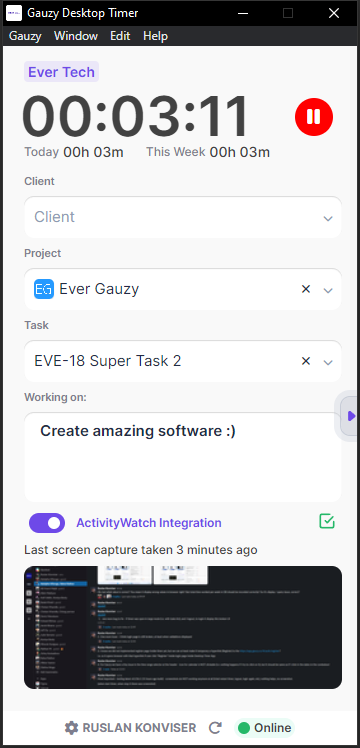
### Desktop Timer UI (Standard)
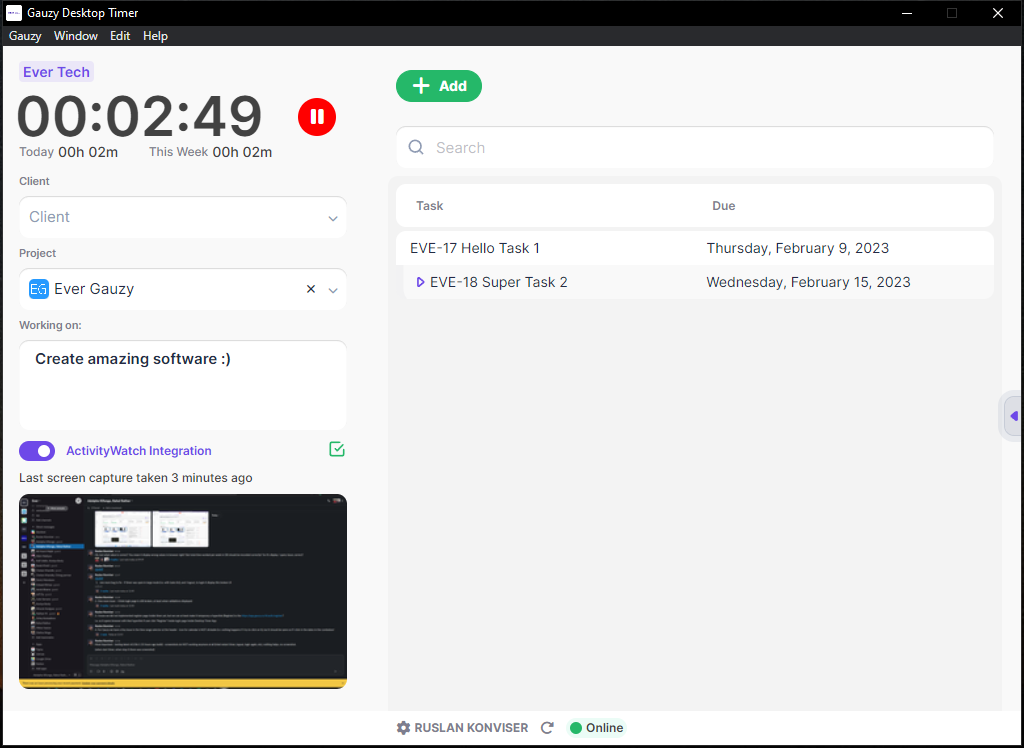
### Desktop Timer UI (Expanded)
</details>
## 🔗 Links
- **<https://gauzy.co>** - check more information about the platform at the official website.
- **<https://app.gauzy.co>** - SaaS (Important: it's currently in Alpha version/testing mode, please use it cautiously).
- **<https://demo.gauzy.co>** - Online Demo (see more info below).
- **<https://gauzy.co/downloads>** - Download Platform & Apps (see also more info below about available downloads).
- **<https://docs.gauzy.co>** - Platform Documentation (WIP). See also our [Wiki](https://github.com/ever-co/ever-gauzy/wiki).
- **<https://ever.co>** - get more information about our company products.
## 💻 Demo, Downloads, Testing and Production
### Demo
Ever Gauzy Platform Demo at <https://demo.gauzy.co>.
Notes:
- Default super-admin user login is `admin@ever.co` and the password is `admin`. These are DEMO / local-development credentials only: a production install must set `DEMO_SUPER_ADMIN_PASSWORD`, `DEMO_ADMIN_PASSWORD` and `DEMO_EMPLOYEE_PASSWORD` before its first boot, and the API refuses to seed without them.
- Content of demo DB resets on each deployment to the demo environment (usually daily)
- Demo environment deployed using CI/CD from the `develop` branch
### Downloads
You can download Gauzy Platform, Gauzy Server, or Desktop Apps (Windows/Mac/Linux) from the official [Downloads](https://web.gauzy.co/downloads) page.
In addition, all releases and pre-releases downloads are also available from the following pages:
- [Platform Releases](https://github.com/ever-co/ever-gauzy/releases)
- [Apps](https://github.com/ever-co/ever-gauzy/wiki/Gauzy-Desktop-Apps)
### Production (SaaS)
Ever® Gauzy™ Platform SaaS is available at <https://app.gauzy.co>.
Note: it's currently in Alpha version/testing mode, please use it cautiously!
### Staging
- Gauzy Platform Staging builds (using CI/CD, from the `stage` branch) are available at <https://stage.gauzy.co>
- We are using the Staging environment to test releases before they are deployed to the production environment
- Our pre-releases of desktop/server apps are built from this environment and can be configured manually (in settings) to connect to Stage API: <https://apistage.gauzy.co>
### Server & Desktop Apps
We have Gauzy Server and two Desktop Apps (for Windows/Mac/Linux):
- Ever® Gauzy™ Server - includes Gauzy API, SQLite DB (or connects to external PostgreSQL) and serves Guazy frontend. It allows to quickly run Gauzy Server for multiple clients (browser-based or Desktop-based). It's a recommended option if you want to setup the Ever Gauzy Platform in small to medium organizations.
- Ever® Gauzy™ Desktop App - includes Gauzy frontend (UI), Gauzy API, SQLite DB, etc., all-in-one! It allows to quickly run the whole Gauzy solution locally, both UI and Timer (for time tracking, optionally of course). In addition, it allows you to connect to the external database (e.g. PostgreSQL) or external API (if you have Gauzy Server with API / DB installed on a different computer or if you want to connect to our live API). It's a recommended option if you want to try Gauzy quickly / for personal use or if you want to connect to Gauzy Server in the "client-server" configuration (and use Desktop App instead of web browser).
- Ever® Gauzy™ Desktop Timer App - allows running Time and Activity Tracking for employees/contractors with screenshots and activity monitoring. It is recommended to setup by organization employees as long as they are not interested in other Gauzy Platform features (e.g. accounting) and only need to track work time.
More information about our Server & Desktop Apps:
- Download for your OS from the official [Downloads](https://web.gauzy.co/downloads) page or see the section "Download" above for other links to our releases pages.
- Setup Gauzy Server with default choices in Setup Wizard and run it.
- You can also setup Gauzy Desktop App (can run independently or connect to Gauzy Server) or Gauzy Desktop Timer App (should be connected to Gauzy Server)
- Gauzy Server and Gauzy Desktop App create three accounts on their first start: `admin@ever.co` (Super Admin), `local.admin@ever.co` (Admin) and `employee@ever.co` (Employee). Each gets a random password generated for that installation, which the app shows once, right after that first start: save them then (you can change them later on your profile page). Sign in as `admin@ever.co` to check Admin functionality. Note: such an Admin user is not an employee, so you will not be able to track time.
- Sign in as `employee@ever.co` to check Employee-related functionality in Gauzy UI or to run Desktop Timer from an "Employee" perspective (such a user is an Employee and can track time).
- An installation set up before these random passwords keeps its existing ones (`admin` and `12345678`) and shows a warning at every start until you change them.
- Gauzy Desktop App's integrated server accepts connections from the same computer only. To serve other computers (for example the Desktop Timer apps of your team), use Gauzy Server: it accepts connections from the network unless you turn off "Allow other computers on the network to connect" in its settings.
- If you install Gauzy Server, it is possible to connect to it using a browser (by default on <http://localhost:4200>) or using Gauzy Desktop Apps (make sure to configure Desktop apps to connect to Gauzy API on <http://127.0.0.1:3000/api> because it's where Gauzy Server API runs by default).
- You can read more information about our Desktop Apps on the [Desktop Apps Wiki Page](https://github.com/ever-co/ever-gauzy/wiki/Gauzy-Desktop-Apps) and our Server at the [Server Wiki Page](https://github.com/ever-co/ever-gauzy/wiki/Gauzy-Server).
## 🧱 Technology Stack and Requirements
- [TypeScript](https://www.typescriptlang.org)
- [NodeJs](https://nodejs.org) / [NestJs](https://github.com/nestjs/nest)
- [Nx](https://nx.dev) / [Lerna](https://github.com/lerna/lerna)
- [Angular](https://angular.io) / [RxJS](http://reactivex.io/rxjs) / [Ngx-admin](https://github.com/akveo/ngx-admin)
- [TypeORM](https://github.com/typeorm/typeorm) / [MikroORM](https://github.com/mikro-orm/mikro-orm) / [Knex](https://github.com/knex/knex)
For Production, we recommend:
- [PostgreSQL](https://www.postgresql.org) or [MySQL](https://dev.mysql.com)
- [Kubernetes](https://kubernetes.io), [Docker](https://www.docker.com)
Note: thanks to TypeORM / MikroORM, Gauzy will support lots of DBs: SQLite (default, for demos), PostgreSQL (development/production), MySql (development/production), MariaDb, CockroachDb, MS SQL, Oracle, MongoDb, and others (with minimal changes).
#### See also README.md and CREDITS.md files in relevant folders for lists of libraries and software included in the Platform, information about licenses, and other details
## 📄 Documentation
Please refer to our official [Platform Documentation](https://docs.gauzy.co) and our [Wiki](https://github.com/ever-co/ever-gauzy/wiki) (WIP).
## 🚀 Quick Start
### Super Quick Start
<https://app.gauzy.co>.
Note: it's currently in Alpha version/testing mode, please use it cautiously!
### Run with Docker Compose
- Clone repo.
- Make sure you have the latest Docker Compose [installed locally](https://docs.docker.com/compose/install). Important: you need a minimum [v2.20](https://docs.docker.com/compose/release-notes/#2200).
#### Demo
- Run `docker-compose -f docker-compose.demo.yml up`, if you want to run the platform in basic configuration (e.g. for Demo / explore functionality / quick run) using our prebuilt Docker images. Check `.env.demo.compose` file for different settings (optionally), e.g. DB type. _(Note: Docker Compose will use latest images pre-build automatically from head of `master` branch using GitHub CI/CD.)_
- Open <http://localhost:4200> in your browser.
- Login with email `admin@ever.co` and password: `admin` for Super Admin user.
- Login with email `employee@ever.co` and password: `12345678` for Employee user.
- Enjoy!
Note: those credentials exist only because this stack runs with `DEMO=true`. They are NOT available in a production deployment — see below.
#### Production
- Edit `.env.compose`: you **must** set `JWT_SECRET`, `JWT_REFRESH_TOKEN_SECRET`, `JWT_VERIFICATION_TOKEN_SECRET` and `EXPRESS_SESSION_SECRET` to strong, unique values (e.g. `openssl rand -hex 64`). The API refuses to start on the shipped blank/default secrets — shared defaults let anyone forge authentication tokens and sessions. Adjust any other settings (e.g. DB type) there too.
- You **must** also set `DEMO_SUPER_ADMIN_PASSWORD`, `DEMO_ADMIN_PASSWORD` and `DEMO_EMPLOYEE_PASSWORD` (and optionally the matching `*_EMAIL` variables). The first boot against an empty database seeds a Super Admin, an Admin and an Employee from those variables, and their shipped defaults are documented right here in this README — so the API refuses to seed while they are unset or left at the defaults.
- Set `TRUST_PROXY` to the number of proxy hops in front of the API (`1` behind a single nginx/ingress) or to your trusted proxy CIDRs, so the login rate limiter counts against the real client address. Set `THROTTLE_TRUST_CF_CONNECTING_IP=true` only if every request reaches the API through Cloudflare. If Ever Teams runs against this API, set `EVER_TEAMS_CLIENT_IP_SECRET` to the same strong value (at least 32 characters) on both, so the per-address limits on sign-in, invites and password reset count each browser instead of the Ever Teams server; signed-in requests are limited per user.
- Set `REDIS_ENABLED=true` (with `REDIS_URL`, or `REDIS_HOST`/`REDIS_PORT`) when you run more than one API replica: rate-limit buckets are otherwise per-process, so the effective limit is multiplied by the replica count.
- Failed sign-ins are also counted per account: once `AUTH_MAX_FAILED_ATTEMPTS` (default 10) consecutive failures for one account have come from at least two different client addresses, that account answers HTTP 429 (with `Retry-After`) for `AUTH_LOCKOUT_SECONDS` (default 900). Failures from a single address never block an account. Because anyone who knows an email address can submit wrong passwords for it, an attacker with several addresses can still block that account for a while; set `AUTH_MAX_FAILED_ATTEMPTS=0` to switch the per-account control off and rely on the per-address rate limit alone.
- Run `docker-compose up -d`, if you want to run the platform in minimal production configuration using our prebuilt Docker images. _(Note: Docker Compose will use latest images pre-build automatically from head of `master` branch using GitHub CI/CD.)_
Note: we recommend using Kubernetes for production workloads instead of Docker Compose!
#### Self-hosting with Caddy (automatic HTTPS)
[`docker-compose.caddy.yml`](docker-compose.caddy.yml) runs Gauzy (prebuilt API and web app images, PostgreSQL) behind [Caddy](https://caddyserver.com), which obtains and renews HTTPS certificates by itself:
- `cp .env.caddy.sample .env.caddy` and fill in every empty value in `.env.caddy`: the database password and the four secrets above (e.g. from `openssl rand -hex 64`), and the three `DEMO_*_PASSWORD` values (e.g. from `openssl rand -hex 24`: the sign-in form takes at most 50 characters). Docker Compose refuses to start while one is missing. `.env.caddy` is git-ignored.
- Set `GAUZY_DOMAIN` to your domain (its DNS must point at the server, with ports 80 and 443 open) to get a Let's Encrypt / ZeroSSL certificate, or keep `localhost` to try it locally with Caddy's own certificate authority (your browser warns until you trust it).
- Run `docker compose -f docker-compose.caddy.yml --env-file .env.caddy up -d` and open `https://<GAUZY_DOMAIN>`.
Caddy is the only container published on the host. It serves everything from one origin: `/api`, `/graphql` (including subscriptions), `/public` (uploaded files) and `/swg` (Swagger UI, with the OpenAPI document at `/swg-json` and `/swg-yaml`) go to the API, the rest to the web app, and `TRUST_PROXY=1` is set for you because the API is reachable only through Caddy. The stack also runs Redis and the worker, which fires the scheduled jobs (outbox dispatch, webhook retries, sweeps): without them outbound webhooks, the search index and GraphQL subscriptions receive no events. Other settings are read from `.env.compose`. Uploaded files are kept in a volume. The routing lives in [`.deploy/caddy/Caddyfile`](.deploy/caddy/Caddyfile).
#### Build
- Edit `.env.compose` (if needed) to use your custom settings, e.g. DB type.
- Run `docker-compose -f docker-compose.build.yml up -d`, if you want to build everything (code and Docker images) locally. _(Note: this is extremely long process because it builds whole platform locally. Other options above are much faster!)_
- :coffee: time... It might take some time for our API to seed fake data in the DB during the first Docker Compose run, even if you used prebuilt Docker images.
Notes:
- while demo `docker-compose.demo.yml` runs a minimum amount of containers (API, Web UI, and DB), other Docker Compose files run multiple infrastructure dependencies (see full list below).
- `docker-compose.yml` and `docker-compose.build.yml` also run a `worker` container next to the API. With Redis enabled the API only enqueues scheduled jobs, so the worker is what fires them, including the per-minute event outbox dispatch that delivers webhooks.
- you can also run ONLY infra dependencies (without our API / Web containers) with `docker-compose -f docker-compose.infra.yml up -d` command. We already doing it using `include` in our main docker compose files.
- API and Web UI settings live in the service `env_file` (`.env.compose`, or `.env.demo.compose` for the demo): edit that file to change them. Their lines read `KEY=${KEY:-default}`, and Docker Compose resolves `${...}` in an env file from the shell and `--env-file` first, so a shell variable or `--env-file .env.something` on the docker-compose `up` command still overrides a single setting (ports and host names in the compose files themselves are read from there too). `DEMO` and the variables without a `${...}` default are read from the env file only.
Together with Gauzy, the Docker Compose commands described above for Production (`docker-compose.yml`) and Build (`docker-compose.build.yml`) will run the following infrastructure components:
- [PostgreSQL](https://www.postgresql.org) - Primary Database.
- [Pgweb](https://github.com/sosedoff/pgweb) - Cross-platform client for PostgreSQL DBs, available on <http://localhost:8081>.
- [OpenSearch](https://github.com/opensearch-project) - Search Engine.
- [OpenSearch Dashboards](https://