项目 / nashtech-garage/yas
nashtech-garage/yas
行业推荐
语言 Java标签 javakubernetesmicroservicessample-projectspring-boothacktoberfestkeycloakecommerceshopdocker数据更新 2026-11-24 06:50:13 · 仓库 2026-11-23
一段话介绍
用 Java 编写的示例微服务网店项目(Yet Another Shop),用来练习搭建较典型的微服务应用。源文列出的技术方向包括 Java 25、Spring Boot 4.0、Next.js、Keycloak、Kafka、Elasticsearch 和 Kubernetes 等。本地可用 Docker Compose 启动:先按[仓库 README](https://github.com/nashtech-garage/yas) 在 hosts 中加入所需域名,再执行 `docker compose up`;源文写明若要启动全部容器,主机内存建议至少 16 GB,也可只用 `docker compose -f docker-compose.yml up` 启动核心服务。随后可从店面和后台等地址访问,架构与开发说明见仓库 `docs` 目录。
本站整理,非 GitHub 官方 description。
官方 description(GitHub API 原样)YAS: Yet Another Shop, a sample microservices project in Java
1,992累计星
743Fork
—峰值日增
0上榜次数
官方快照(gh_history.db,2026-11-25):总榜 未进 Top50 · 日榜 未进 Top50 · 周榜未满 7 天基线(官方不生成) · 月榜暂无官方口径;下方四卡为站内趋势聚合(周卡按上榜次数,非官方 7 日增量窗)。
电商交易与订单履约
适配系统:交易中台、订单履约系统 · 得分 2.8
内置商品、购物车、订单与支付对象模型,可作为电商交易中台直接改造复用。
更多信息
以下三段按该项目自己的 GitHub README 章节摘录(可合理截断并标明);README 没有对应章节的留空,不编造。
我的用法
本地运行需在 hosts 添加多个域名映射,再执行 docker compose up 启动,全部容器至少需 16GB 内存,随后经 storefront、backoffice 等地址访问各服务。
特点或设计要点
仓库按店面、后台、商品、购物车、订单、库存、支付、搜索等服务拆分,并配有相应的持续集成工作流。除核心 compose 文件外,还有搜索和可观测性相关的 compose 文件。Kubernetes 部署说明见仓库 `k8s/deploy` 目录。源文提示首次启动后若店面或后台表现异常,可停止后再执行一次 `docker compose up`。
星标走势还差一天的数据,明天就能看到曲线
每天 10:30 记一次星标,连续两天后自动生成曲线
GitHub 项目主页介绍
来自 GitHub 仓库 README / 主页介绍正文,原样摘录,共 7,139 字节。
# YAS: Yet Another Shop
YAS is a pet project aim to practice building a typical microservice application in Java
[](https://github.com/nashtech-garage/yas/actions/workflows/gitleaks-check.yaml)
[](https://github.com/nashtech-garage/yas/actions/workflows/storefront-ci.yaml)
[](https://github.com/nashtech-garage/yas/actions/workflows/storefront-bff-ci.yaml)
[](https://github.com/nashtech-garage/yas/actions/workflows/backoffice-ci.yaml)
[](https://github.com/nashtech-garage/yas/actions/workflows/backoffice-bff-ci.yaml)
[](https://github.com/nashtech-garage/yas/actions/workflows/product-ci.yaml)
[](https://github.com/nashtech-garage/yas/actions/workflows/media-ci.yaml)
[](https://github.com/nashtech-garage/yas/actions/workflows/cart-ci.yaml)
[](https://github.com/nashtech-garage/yas/actions/workflows/customer-ci.yaml)
[](https://github.com/nashtech-garage/yas/actions/workflows/rating-ci.yaml)
[](https://github.com/nashtech-garage/yas/actions/workflows/location-ci.yaml)
[](https://github.com/nashtech-garage/yas/actions/workflows/order-ci.yaml)
[](https://github.com/nashtech-garage/yas/actions/workflows/inventory-ci.yaml)
[](https://github.com/nashtech-garage/yas/actions/workflows/tax-ci.yaml)
[](https://github.com/nashtech-garage/yas/actions/workflows/search-ci.yaml)
[](https://github.com/nashtech-garage/yas/actions/workflows/promotion-ci.yaml)
[](https://github.com/nashtech-garage/yas/actions/workflows/payment-ci.yaml)
[](https://github.com/nashtech-garage/yas/actions/workflows/payment-paypal-ci.yaml)
[](https://github.com/nashtech-garage/yas/actions/workflows/webhook-ci.yaml)
## Tentative technologies and frameworks
- Java 25
- Spring Boot 4.0
- Testcontainers
- Next.js
- Keycloak
- Kafka
- Elasticsearch
- K8s
- GitHub Actions
- SonarCloud
- OpenTelemetry
- Grafana, Loki, Prometheus, Tempo
## Local development architecture
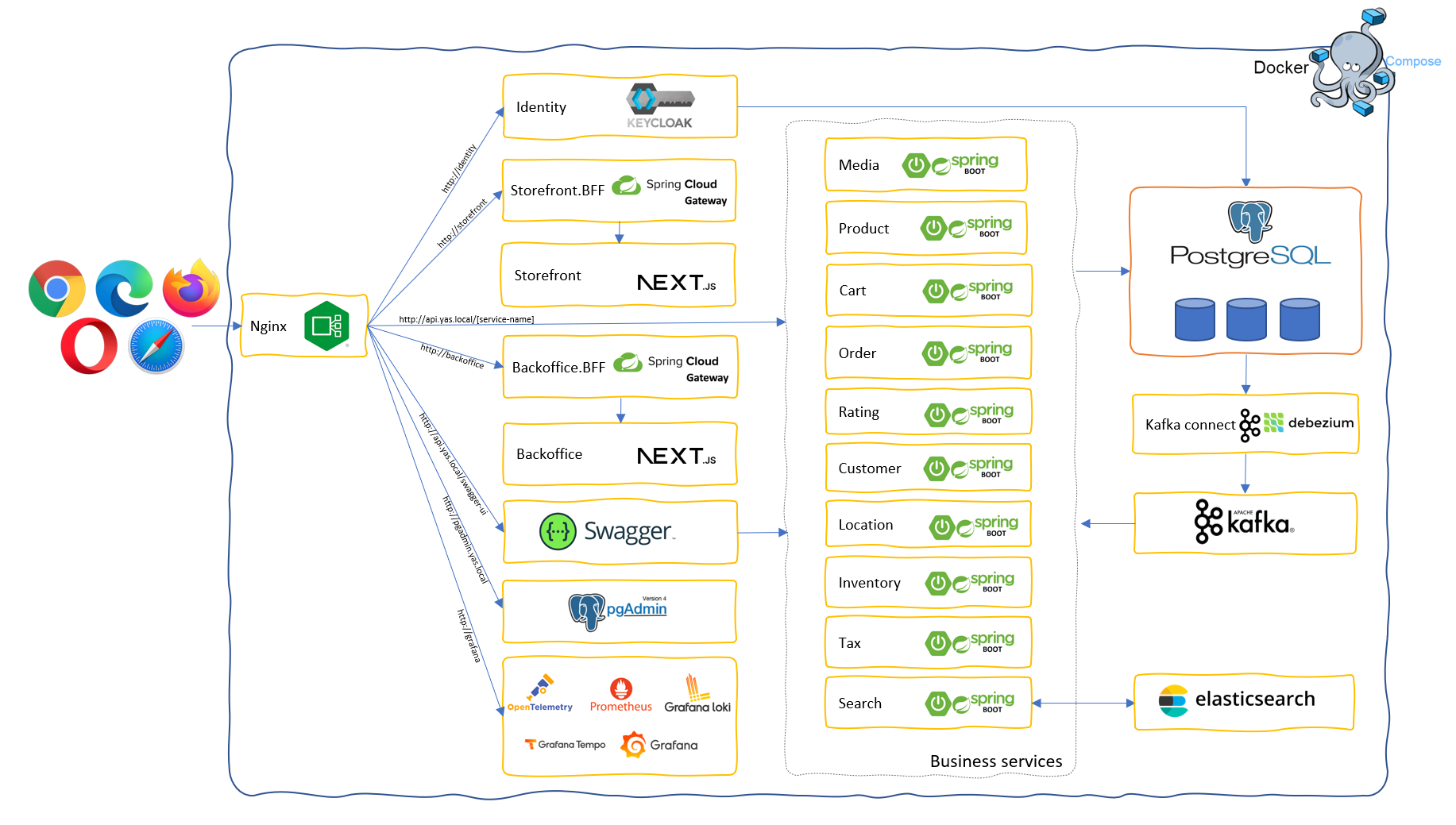
## Getting started with Docker Compose
1. Get the latest source code
2. Add the following records to your host file:
```
127.0.0.1 identity
127.0.0.1 api.yas.local
127.0.0.1 pgadmin.yas.local
127.0.0.1 storefront
127.0.0.1 backoffice
127.0.0.1 loki
127.0.0.1 tempo
127.0.0.1 grafana
127.0.0.1 elasticsearch
127.0.0.1 kafka
```
3. Open terminal of your choice, go to `yas` directory, run `docker compose up`, wait for all the containers up and running
> *_Warning:_* To run all the containers, you need a minimum of 16GB of RAM. Otherwise, you can only run the core services with this command `docker compose -f docker-compose.yml up`
4. All the containers up and running then we start source connectors by run script, open any terminal window... go to the YAS root folder and type: ./start-source-connectors.sh
5. Open your browser, now you can access the websites via `http://storefront/`; `http://backoffice/` login with admin/password
> *_Note:_* For the first run, the storefront and the backoffice might not work as expected. Stop all the containers (Ctrl + C) and run docker compose up again.
#### You might also want to explore:
1. `http://pgadmin.yas.local/`. Account login: `admin@yas.com` / admin. Register a server: postgres, port 5432, username admin, password admin. The Postgresql server is also exposed to the host machine: servername: localhost, port: 5432, username: admin, password: admin
2. `http://api.yas.local/swagger-ui/` for all the REST API document of all the services
3. `http://identity/` for Keycloak console, account admin/admin
4. `http://grafana/` for observability: log, trace, matrix
5. `http://elasticsearch/` for calling Elasticsearch APIs
#### About docker-compose files
1. docker-compose.yml for all core services
2. docker-compose.search.yml for search service
3. docker-compose.o11y.yml for observability services
## Deploy to Kubernetes
https://github.com/nashtech-garage/yas/tree/main/k8s/deploy
## Documentation
- [Architecture and components](https://github.com/nashtech-garage/yas/tree/main/docs)
- [Developer guidelines](https://github.com/nashtech-garage/yas/tree/main/docs/developer-guidelines.md)
## Contributing
- Give us a star
- Reporting a bug
- Participate discussions
- Propose new features
- Submit pull requests. If you are new to GitHub, consider to [learn how to contribute to a project through forking](https://docs.github.com/en/get-started/quickstart/contributing-to-projects)
By contributing, you agree that your contributions will be licensed under MIT License.
## Screenshots
<table>
<thead>
<tr>
<th>Backoffice & Storefront</th>
<th>Observability</th>
</tr>
</thead>
<tbody>
<tr valign="top">
<td>
<img src="screenshots/yas-backoffice.png" alt="Yas Backoffice"/>
<img src="screenshots/yas-storefront.png" alt="Yas Storefront"/>
<img src="screenshots/yas-swagger.png" alt="Yas Swagger"/>
</td>
<td>
<img src="screenshots/yas-grafana-tracing.png" alt="Yas Grafana Tracing"/>
<img src="screenshots/yas-grafana-metrics.png" alt="Yas Grafana Metrics"/>
</td>
</tr>
</tbody>
</table>
