项目 / neuml/paperai
面向医学和科学论文的人工智能应用,用来在已整理的文献集合上批量回答问题。它通过大语言模型提示和检索增强生成(RAG)流程处理文章库,并用配置文件组织批量推理;结果可输出为 Markdown、CSV,并在有 PDF 时直接在文件上标注答案。索引建立在先前由 [paperetl](https://github.com/neuml/paperetl) 构建的数据库之上。可用 `pip install paperai` 安装,建议 Python 3.10 及以上的虚拟环境;也可用仓库中的 Dockerfile 构建镜像。本页按研究与文献检索用途介绍,不涉及诊疗判断。说明见[仓库 README](https://github.com/neuml/paperai)。
本站整理,非 GitHub 官方 description。
官方快照(gh_history.db,2026-11-25):总榜 未进 Top50 · 日榜 未进 Top50 · 周榜未满 7 天基线(官方不生成) · 月榜暂无官方口径;下方四卡为站内趋势聚合(周卡按上榜次数,非官方 7 日增量窗)。
以下三段按该项目自己的 GitHub README 章节摘录(可合理截断并标明);README 没有对应章节的留空,不编造。
安装或使用说明见 https://neuml.github.io/txtai/install/#environment-specific-prerequisites。
paperai 由 txtai 嵌入索引、存文章的 SQLite 数据库和 LLM 组成,经 txtai RAG 管线整合,文章按节解析存储并建立全语料嵌入,可通过 report、query、shell 三种入口交互。
来自 GitHub 仓库 README / 主页介绍正文,原样摘录,共 11,310 字节。
<p align="center">
<img src="https://raw.githubusercontent.com/neuml/paperai/master/logo.png"/>
</p>
<p align="center">
<b>AI for medical and scientific papers</b>
</p>
<p align="center">
<a href="https://github.com/neuml/paperai/releases">
<img src="https://img.shields.io/github/release/neuml/paperai.svg?style=flat&color=success" alt="Version"/>
</a>
<a href="https://github.com/neuml/paperai/releases">
<img src="https://img.shields.io/github/release-date/neuml/paperai.svg?style=flat&color=blue" alt="GitHub Release Date"/>
</a>
<a href="https://github.com/neuml/paperai/issues">
<img src="https://img.shields.io/github/issues/neuml/paperai.svg?style=flat&color=success" alt="GitHub issues"/>
</a>
<a href="https://github.com/neuml/paperai">
<img src="https://img.shields.io/github/last-commit/neuml/paperai.svg?style=flat&color=blue" alt="GitHub last commit"/>
</a>
<a href="https://github.com/neuml/paperai/actions?query=workflow%3Abuild">
<img src="https://github.com/neuml/paperai/workflows/build/badge.svg" alt="Build Status"/>
</a>
<a href="https://coveralls.io/github/neuml/paperai?branch=master">
<img src="https://img.shields.io/coverallsCoverage/github/neuml/paperai" alt="Coverage Status">
</a>
</p>
-------------------------------------------------------------------------------------------------------------------------------------------------------
`paperai` is an AI application for medical and scientific papers.
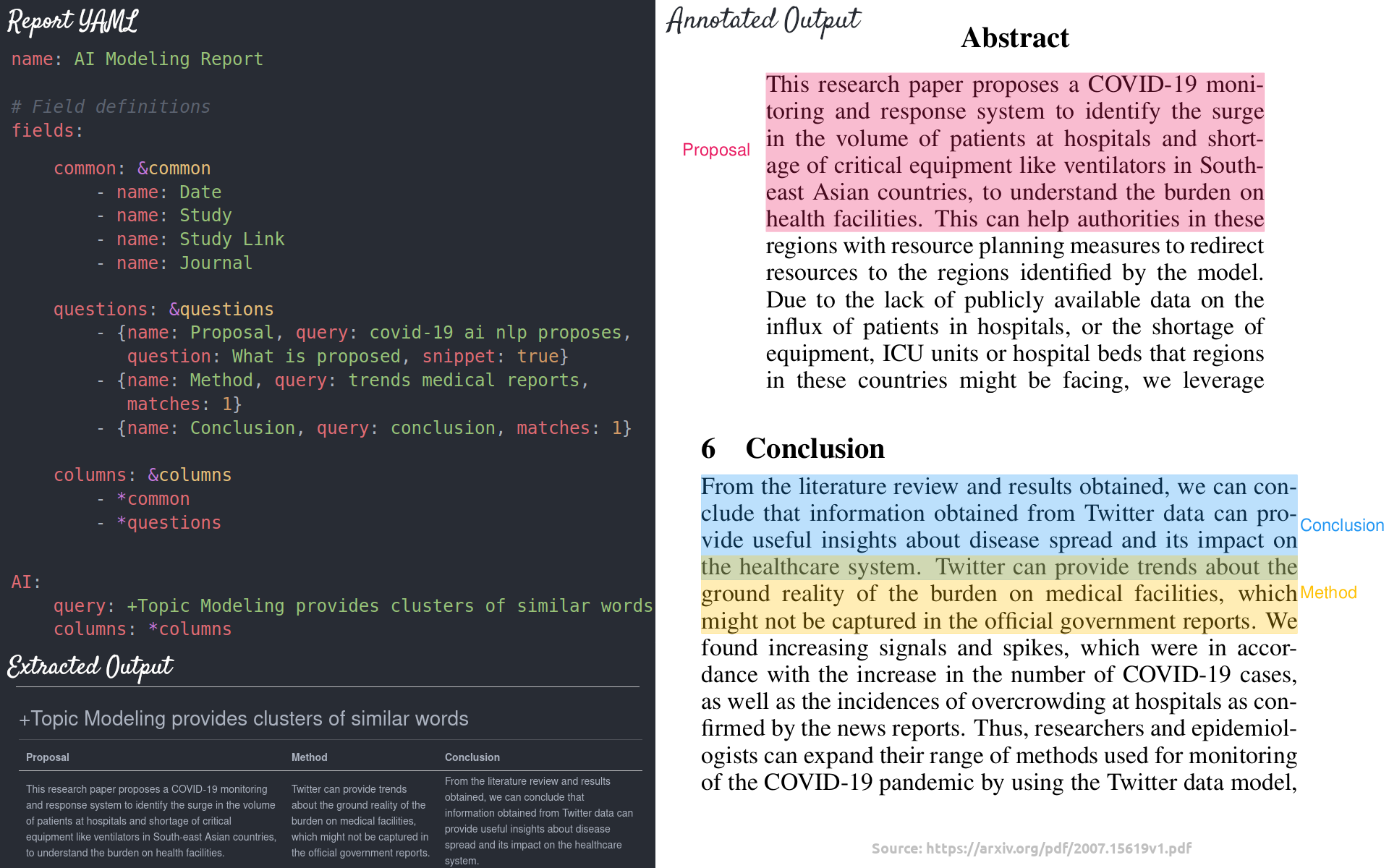
⚡ Supercharge research tasks with AI-driven report generation. A `paperai` application goes through repositories of articles and generates bulk answers to questions backed by Large Language Model (LLM) prompts and Retrieval Augmented Generation (RAG) pipelines.
A `paperai` configuration file enables bulk LLM inference operations in a performant manner. Think of it like kicking off hundreds of ChatGPT prompts over your data.
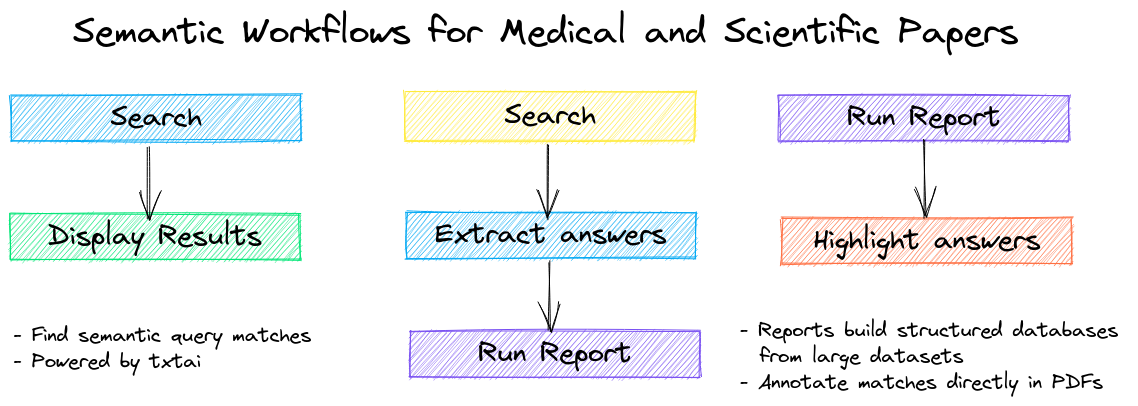
`paperai` can generate reports in Markdown, CSV and annotate answers directly on PDFs (when available).
## Installation
The easiest way to install is via pip and PyPI
```
pip install paperai
```
Python 3.10+ is supported. Using a Python [virtual environment](https://docs.python.org/3/library/venv.html) is recommended.
`paperai` can also be installed directly from GitHub to access the latest, unreleased features.
```
pip install git+https://github.com/neuml/paperai
```
See [this link](https://neuml.github.io/txtai/install/#environment-specific-prerequisites) to help resolve environment-specific install issues.
### Docker
Run the steps below to build a docker image with `paperai` and all dependencies.
```
wget https://raw.githubusercontent.com/neuml/paperai/master/docker/Dockerfile
docker build -t paperai .
docker run --name paperai --rm -it paperai
```
paperetl can be added in to have a single image to index and query content. Follow the instructions to build a [paperetl docker image](https://github.com/neuml/paperetl#docker) and then run the following.
```
docker build -t paperai --build-arg BASE_IMAGE=paperetl --build-arg START=/scripts/start.sh .
docker run --name paperai --rm -it paperai
```
## Examples
The following notebooks and applications demonstrate the capabilities provided by `paperai`.
### Notebooks
| Notebook | Description | |
|:----------|:-------------|------:|
| [Introducing paperai](https://github.com/neuml/paperai/blob/master/examples/01_Introducing_paperai.ipynb) | Overview of the functionality provided by paperai | [](https://colab.research.google.com/github/neuml/paperai/blob/master/examples/01_Introducing_paperai.ipynb) |
| [Medical Research Project](https://github.com/neuml/paperai/blob/master/examples/02_Medical_Research_Project.ipynb) | Research young onset colon cancer | [](https://colab.research.google.com/github/neuml/paperai/blob/master/examples/02_Medical_Research_Project.ipynb) |
### Applications
| Application | Description |
|:----------|:-------------|
| [Search](https://github.com/neuml/paperai/blob/master/examples/search.py) | Search a `paperai` index. Set query parameters, execute searches and display results. |
## Building a model
`paperai` indexes databases previously built with [paperetl](https://github.com/neuml/paperetl). The following shows how to create a new `paperai` index.
1. (Optional) Create an index.yml file
`paperai` uses the default txtai embeddings configuration when not specified. Alternatively, an index.yml file can be specified that takes all the same options as a txtai embeddings instance. See the [txtai documentation](https://neuml.github.io/txtai/embeddings/configuration) for more on the possible options. A simple example is shown below.
```
path: sentence-transformers/all-MiniLM-L6-v2
content: True
```
2. Build embeddings index
```
python -m paperai.index <path to input data> <optional index configuration>
```
The paperai.index process requires an input data path and optionally takes index configuration. This configuration can either be a vector model path or an index.yml configuration file.
## Running queries
The fastest way to run queries is to start a `paperai` shell
```
paperai <path to model directory>
```
A prompt will come up. Queries can be typed directly into the console.
## Report schema
The following steps through an example `paperai` report configuration file and describes each section.
```yaml
name: ColonCancer
options:
llm: Intelligent-Internet/II-Medical-8B-1706-GGUF/II-Medical-8B-1706.Q4_K_M.gguf
system: You are a medical literature document parser. You extract fields from data.
template: |
Quickly extract the following field using the provided rules and context.
Rules:
- Keep it simple, don't overthink it
- ONLY extract the data
- NEVER explain why the field is extracted
- NEVER restate the field name only give the field value
- Say no data if the field can't be found within the context
Field:
{question}
Context:
{context}
context: 5
params:
maxlength: 4096
stripthink: True
Research:
query: colon cancer young adults
columns:
- name: Date
- name: Study
- name: Study Link
- name: Journal
- {name: Sample Size, query: number of patients, question: Sample Size}
- {name: Objective, query: objective, question: Study Objective}
- {name: Causes, query: possible causes, question: List of possible causes}
- {name: Detection, query: diagnosis, question: List of ways to diagnose}
```
### Configuration
The following shows the top level configuration options.
| Field | Description |
|:------------ |:-------------|
| name | Report name |
| options | RAG pipeline options - set the LLM, prompt templates, max length and more|
| report | Each unique top level parameter sets the report name. In the example above, it's called `Research` |
| query | Vector query that identifies the top n documents |
| columns | List of columns |
### Standard columns
Standard columns use the article data store metadata to simply copy fields into a report. Set the column `name` to one of the values below.
| Field | Description |
|:------------ |:-------------|
| Id | Article unique identifier |
| Date | Article publication date |
| Study | Title of the article |
| Study Link | HTTP link to the study |
| Journal | Publication name |
| Source | Data source name |
| Entry | Article entry date |
| Matches | Sections that caused this article to match the report query |
### Generated columns
The most novel feature of `paperai` is being able to generate dynamic columns driven by a RAG pipeline. Each field takes the following parameters.
| Parameter | Description |
|:------------ |:-------------|
| name | Column name |
| query | search/similarity query |
| question | llm question parameter |
For each matching article, the `query` sorts each section by relevance to that query. This can be a vector query, keyword query or hybrid query. This is controlled by the embeddings index configuration. The `question` is plugged into the RAG pipeline template along with the top n matching context elements from the query. The generated column is stored as `name` in the report output.
## Building a report file
Reports can generate output in multiple formats. An example report call:
```
python -m paperai.report crc.yml 10 csv <path to model directory>
```
In the example above, a file named Research.csv will be created with the top 10 most relevant articles.
The following report formats are supported:
- Markdown (Default) - Renders a Markdown report. Columns and answers are extracted from articles with the results stored in a Markdown file.
- CSV - Renders a CSV report. Columns and answers are extracted from articles with the results stored in a CSV file.
- Annotation - Columns and answers are extracted from articles with the results annotated over the original PDF files. Requires passing in a path with the original PDF files.
See the [examples](https://github.com/neuml/paperai/tree/master/examples) directory for report examples. Additional historical report configuration files can be found [here](https://github.com/neuml/cord19q/tree/master/tasks).
## Tech Overview
`paperai` is a combination of a [txtai](https://github.com/neuml/txtai) embeddings index, a SQLite database with the articles and an LLM. These components are joined together in a [txtai RAG pipeline](https://neuml.github.io/txtai/pipeline/text/rag/).
Each article is parsed into sections and stored in a data store along with the article metadata. Embeddings are built over the full corpus. The LLM analyzes context-limited requests and generates outputs.
Multiple entry points exist to interact with the model.
- paperai.report - Builds a report for a series of queries. For each query, the top scoring articles are shown along with matches from those articles. There is also a highlights section showing the most relevant results.
- paperai.query - Runs a single query from the terminal
- paperai.shell - Allows running multiple queries from the terminal
## Recognition
`paperai` and/or NeuML has been recognized in the following articles.
- [Machine-Learning Experts Delve Into 47,000 Papers on Coronavirus Family](https://www.wsj.com/articles/machine-learning-experts-delve-into-47-000-papers-on-coronavirus-family-11586338201)
- [Data scientists assist medical researchers in the fight against COVID-19](https://cloud.google.com/blog/products/ai-machine-learning/how-kaggle-data-scientists-help-with-coronavirus)
- [CORD-19 Kaggle Challenge Awards](https://www.kaggle.com/allen-institute-for-ai/CORD-19-research-challenge/discussion/161447)
