项目 / reactioncommerce/reaction
reactioncommerce/reaction
行业推荐
语言 JavaScript标签 ecommerce-platformecommercecommercereactioncommercee-commercejavascriptcartshopstorefrontmarketplacedockermongodbheadlessgraphqlreaction-actionhacktoberfest数据更新 2026-11-25 06:49:28 · 仓库 2026-11-24
一段话介绍
Project has been discontinued ////// Mailchimp Open Commerce is an API-first, headless commerce platform built using Node.js, React, GraphQL. Deployed via Docker and Kubernetes.
本站整理,非 GitHub 官方 description。
官方 description(GitHub API 原样)Project has been discontinued ////// Mailchimp Open Commerce is an API-first, headless commerce platform built using Node.js, React, GraphQL. Deployed via Docker and Kubernetes.
12,400累计星
2,165Fork
—峰值日增
0上榜次数
官方快照(gh_history.db,2026-11-25):总榜 未进 Top50 · 日榜 未进 Top50 · 周榜未满 7 天基线(官方不生成) · 月榜暂无官方口径;下方四卡为站内趋势聚合(周卡按上榜次数,非官方 7 日增量窗)。
电商交易与订单履约
适配系统:交易中台、订单履约系统 · 得分 4.2
内置商品、购物车、订单与支付对象模型,可作为电商交易中台直接改造复用。
更多信息
以下三段按该项目自己的 GitHub README 章节摘录(可合理截断并标明);README 没有对应章节的留空,不编造。
我的用法
开发 Open Commerce 项目推荐使用官方 CLI,通过命令行创建和操作 API、Admin 和 Storefront 项目。
特点或设计要点
Reaction Commerce主打快速查询、可组合的插件体系与多租户,可在单机到数百台的规模下托管多店铺,并支持产品变体、库存与配送管理。
星标走势还差一天的数据,明天就能看到曲线
每天 10:30 记一次星标,连续两天后自动生成曲线
GitHub 项目主页介绍
来自 GitHub 仓库 README / 主页介绍正文,原样摘录,共 7,889 字节。
<h1 align="center">
Mailchimp Open Commerce (formerly Reaction Commerce)
</h1>
<h4 align="center">
<a href="https://mailchimp.com/developer/open-commerce/">Open Commerce Website</a> |
<a href="https://twitter.com/getreaction">Twitter</a> |
<a href="https://mailchimp.com/developer/open-commerce/">Documentation</a> |
<a href="https://discord.gg/Bwm63tBcQY">Discord</a> |
<a href="https://github.com/reactioncommerce/reaction/discussions">Discussions</a>
</h4>
[Mailchimp Open Commerce](https://mailchimp.com/developer/open-commerce/) is an API-first, headless commerce platform built using Node.js, MongoDB, and GraphQL. It plays nicely with npm, Docker and Kubernetes.
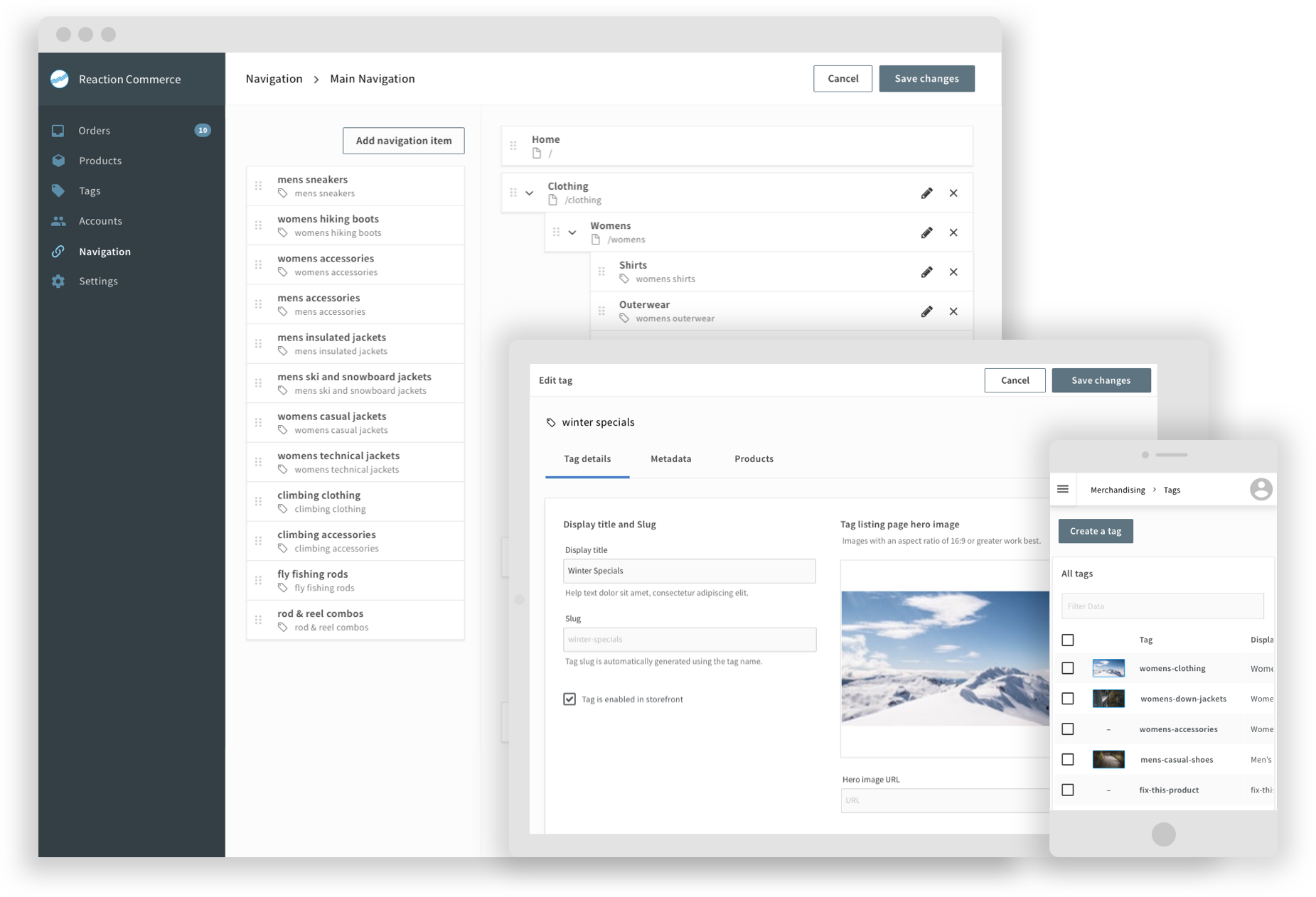
# Features
<table>
<tr><td><strong>Fast</strong></td><td>Returns data in split seconds, and faster queries mean faster web pages</td></tr>
<tr><td><strong>Proven</strong></td><td>Open Commerce fuels sites doing 10's of thousands of orders per day with 100's of thousands of products</td></tr>
<tr><td><strong>Composable</strong></td><td>A flexible plugin system allows you to pick and choose which integrations work best for you</td></tr>
<tr><td><strong>Multi-tenant</strong></td><td>Host multiple shops in the same installation</td></tr>
<tr><td><strong>Scalable</strong></td><td>Start out with a single server and scale up to hundreds</td></tr>
<tr><td><strong>Flexible Products</strong></td><td>Allows Products, with options and variants to fit a wide variety of needs</td></tr>
<tr><td><strong>Inventory</strong></td><td>Track inventory, allow or disallow backorders and more</td></tr>
<tr><td><strong>Shipping</strong></td><td>Integrate with a shipping rate provider or build your own custom table</td></tr>
<tr><td><strong>Taxes</strong></td><td>Integrate with a tax rate provider or build your own custom tax table</td></tr>
<tr><td><strong>Fulfillment</strong></td><td>Flexible fulfillment system allows you create your own fulfillment methods</td></tr>
<tr><td><strong>Order Tracking</strong></td><td>View and manage your orders in the included admin system</td></tr>
<tr><td><strong>Emails</strong></td><td>Customizable templates for Order confirmations and more</td></tr>
<tr><td><strong>Open</strong></td><td>Fully open source. Never be locked in again</td></tr>
</table>
# Getting started
To start working with your own project built on Mailchimp Open Commerce you can start by using our new CLI. The CLI is
the quickest and easiest way to develop on Open Commerce. It allows you to create and work with API, Admin, and Storefront projects all via the command line.
## What you need
- We recommend installing [nvm](https://github.com/nvm-sh/nvm)
- [14.18.1 ≤ Node version < 16](https://nodejs.org/ja/blog/release/v14.18.1/)
- [Git](https://git-scm.com/)
- [Docker](https://www.docker.com/get-started/)
- [Docker Compose](https://docs.docker.com/compose/)
In addition, you need to have your system setup for [SSH authentication with GitHub](https://docs.github.com/en/authentication/connecting-to-github-with-ssh)
## Install the CLI
First install the cli by running:
```
npm install -g reaction-cli
```
You can test to see if it has worked here by running:
```
reaction help
```
## Creating a project
You can create your Open Commerce project by running:
```
reaction create-project api <your-project-name>
```
This will create an Open Commerce project in the directory <your-project-name>.
Once this is complete, navigate to the project directory:
```
cd <your-project-name>
```
Install the project dependencies:
```
npm install
```
Finally, start the server in development mode:
```
reaction develop api
```
Note: Optionally, from within the project-directory you may issue the above command without mentioning the project type and the CLI would check your package.json for the "projectType" and pick it up from there. This expects that the project itself was built using the latest version of the CLI as explained in the above steps.
Example, instead of the above command, you may skip mentioning 'api' and just use:
```
reaction develop
```
This will start the Open Commerce GraphQL server and Mongo Server. Press Ctrl+C to stop.
- A sample custom plugin has been installed, and you should see its output in the logs. (Your Sample Plugin)
- To add a new plugin based on our plugin template run:
```
reaction create-plugin api <your-plugin-name>
```
Validate whether the plugin was created in the `custom-packages`
```
cd custom-packages
```
```
cd <your-plugin-name>
```
```
npm install
```
You now need to change back up to the root:
```
cd ../../
```
now you can run:
```
reaction develop
```
This plugin will now be loaded the next time you start Open Commerce.
### Congratulations!! You're ready to start developing with Open Commerce
See the [Complete CLI instructions](https://github.com/reactioncommerce/cli) for how to create your local storefront and admin.
Go to the complete [installation instructions](https://mailchimp.com/developer/open-commerce/guides/quick-start/#access-the-dashboard-playground-and-storefront) to see how to set up your store
# API development
If you are working on core plugins (not developing plugins for your own installation) you should follow these
instructions
## What you need
- [pnpm](https://pnpm.io/)
- [Docker](https://www.docker.com/get-started/)
- [Docker Compose](https://docs.docker.com/compose/)
## Install PNPM
```bash
npm i -g pnpm@7.11.0
```
## Clone and Start the source
```bash
git clone https://github.com/reactioncommerce/reaction.git
cd reaction
pnpm install
cp apps/reaction/.env.example apps/reaction/.env
```
Start dev-server with mongo on local:
```bash
## you must change MONGO_URL in the .env to mongodb://localhost:27017/reaction before start
pnpm run start:dev
```
Start dev-server with mongodb on docker
```bash
docker-compose up -d
pnpm run start:dev
```
## Development Flow
1. Make some changes in one or more packages.
2. [Add a changeset](https://github.com/changesets/changesets/blob/main/docs/adding-a-changeset.md) in that same PR.
3. Repeat the process of making changes and adding changesets.
4. Create PR
## How to release
1. Run `release` action to create `Version PR`. This PR will remove all changeset files, bump up packages versions, update CHANGELOG files.
2. Merge `Version PR` into trunk, CircleCI will publish all the packages into npm.
## Prerelease flows
1. All PRs will be merged into `prerelease` branch before triggering `PRERELEASE` action.
2. Before merging PRs into `prerelease` branch, please make sure that all the changesets are added.
3. Manually trigger `PRERELEASE` action to create `Version Packages (next)` PR. After merged, the changeset/action will bump up packages versions as `{next-version}-next.{number}`, update CHANGELOG files.
4. Merge `Version Packages (next)` PR into `prerelease` branch, action will publish all the packages into npm.
# Get involved
## Contribute
:star: If you like what you see, star us on GitHub.
Find a bug, a typo, or something that’s not documented well? We’d love for you to [open an issue](https://github.com/reactioncommerce/reaction/issues) telling us what we can improve! This project uses [commitlint](https://commitlint.js.org/), please use their [commit message format](https://www.conventionalcommits.org/en/v1.0.0/#summary).
We love your pull requests! Check out our [`Good First Issue`](https://github.com/reactioncommerce/reaction/issues?q=is%3Aopen+is%3Aissue+label%3A%22good+first+issue%22) and [`Help Wanted`](https://github.com/reactioncommerce/reaction/issues?q=label%3A%22help+wanted%22) tags for good issues to tackle.
Check out our [contributors guide](CONTRIBUTING.md) for more information
### License
Reaction is [GNU GPLv3 Licensed](./LICENSE.md)
