项目 / scottyzen/woonuxt
WooNuxt 是面向 WooCommerce 的现代店面前端,建立在 Nuxt 4 与 WPGraphQL 之上,支持完全静态部署,也可对较大目录使用混合 ISR 渲染,并可用自定义组件和模块扩展。使用前需在 WordPress 中安装并启用 [Settings for WooNuxt](https://wordpress.org/plugins/settings-for-woonuxt/) 插件,按后台说明安装依赖插件并配置店面,再设置 `GQL_HOST` 和 `NUXT_IMAGE_DOMAINS`。本地可在仓库根目录复制环境变量文件后执行 `npm install` 与 `npm run dev`。在线演示见 [demo.woonuxt.com](https://demo.woonuxt.com/)。说明见[项目站](https://woonuxt.com)和[仓库 README](https://github.com/scottyzen/woonuxt)。
本站整理,非 GitHub 官方 description。
官方快照(gh_history.db,2026-11-25):总榜 未进 Top50 · 日榜 未进 Top50 · 周榜未满 7 天基线(官方不生成) · 月榜暂无官方口径;下方四卡为站内趋势聚合(周卡按上榜次数,非官方 7 日增量窗)。
以下三段按该项目自己的 GitHub README 章节摘录(可合理截断并标明);README 没有对应章节的留空,不编造。
安装或使用说明见 https://wordpress.org/plugins/settings-for-woonuxt/。
项目说明文档见 https://demo.woonuxt.com/。
来自 GitHub 仓库 README / 主页介绍正文,正文较长,已截断:保留前 20000 字符(原始 20,963 字节),完整内容见 GitHub 仓库。
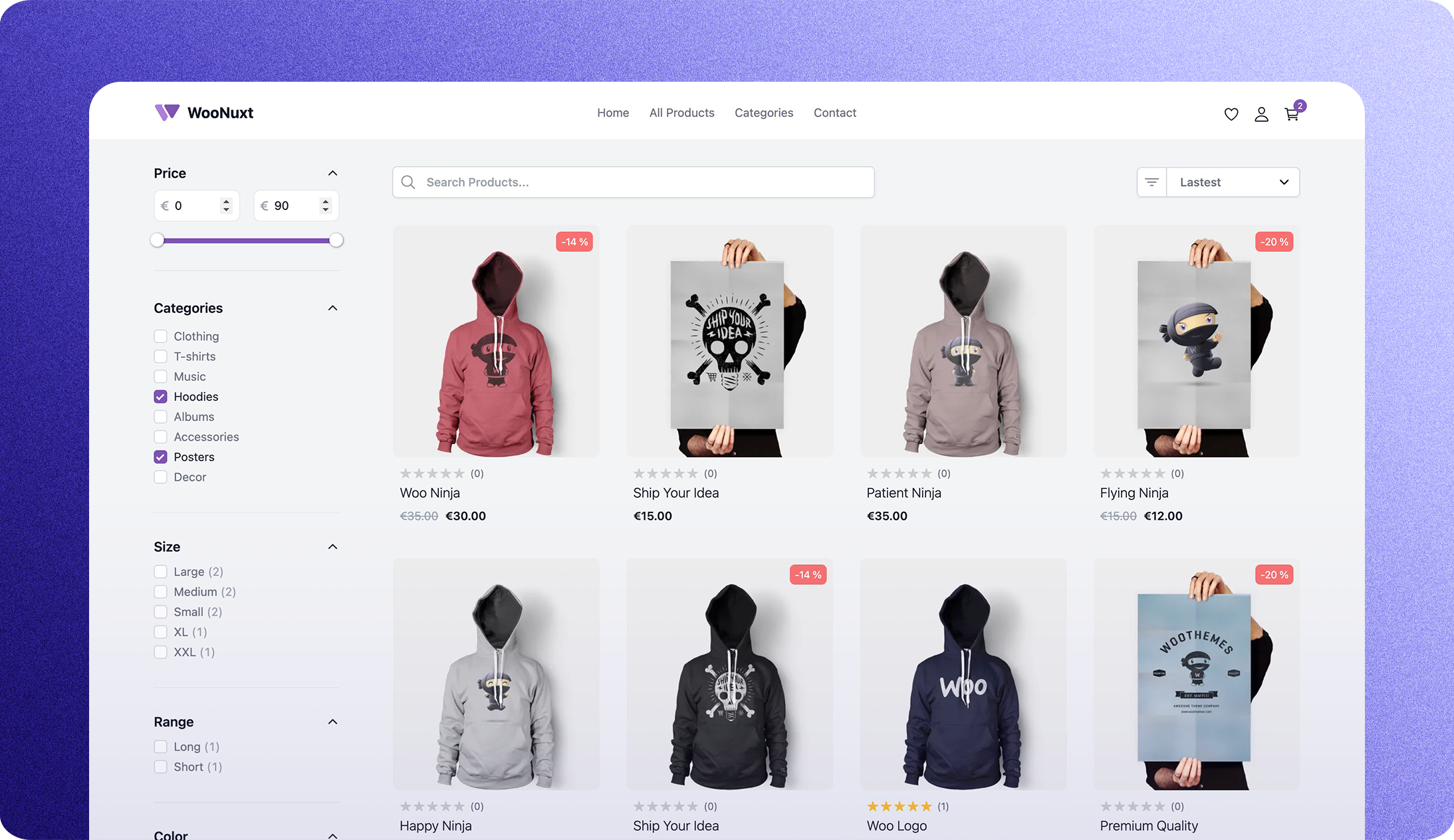
# Next Generation Front-End for WooCommerce
## Introduction
WooNuxt is a modern, fast, and SEO-friendly front-end for WooCommerce. Built on Nuxt 4 and WPGraphQL, it supports both fully static deployment and hybrid ISR rendering for large catalogs. It is fully customizable and can be extended with custom components and modules. You can see a live demo below.
The primary live demo is [demo.woonuxt.com](https://demo.woonuxt.com/).
| Other live examples | URL |
| ------------------- | ------------------------------ |
| Vercel | https://woonuxt-v3.vercel.app/ |
| NuxtHub | https://woo.nuxt.dev/ |
| Customized store | https://myshop.woonuxt.com/ |
## Troubleshooting
You can find some common errors and how to fix them [here](https://woonuxt.com/faq#some-common-errors-to-troubleshoot)
**Symptom: HTML loads, but every `/_nuxt/*.js` and `/_nuxt/*.css` request returns 404.** The publish directory doesn't contain Nuxt's generated bundle — publish `.output/public` (not `dist`) with `npm run generate` as the build command. See [Static Deployment](#static-deployment) below.
## Get Started
- Install the [Settings for WooNuxt](https://wordpress.org/plugins/settings-for-woonuxt/) plugin from the WordPress plugin directory (**Plugins > Add New**, search for "Settings for WooNuxt").
- Activate it, then go to **Settings > WooNuxt** to install the required plugins and configure your storefront. This will install all the required plugins for WooNuxt, add some useful fields to the WPGraphQL schema, and automatically retrieve the WooCommerce payment gateway settings for [Stripe](https://wordpress.org/plugins/woocommerce-gateway-stripe/) and [PayPal](https://woo.com/document/paypal-standard/).
- Once the plugin is activated you are ready to deploy WooNuxt on whatever hosting you like or click one of the fast deploy buttons below.
- Once the plugin is activated, configure `GQL_HOST` and `NUXT_IMAGE_DOMAINS`. Check out the `.env.example` file for details.
[](https://app.netlify.com/start/deploy?repository=https://github.com/scottyzen/woonuxt) [](https://vercel.com/new/clone?repository-url=https%3A%2F%2Fgithub.com%2Fscottyzen%2Fwoonuxt&repository-name=WooNuxt&env=GQL_HOST,NUXT_IMAGE_DOMAINS)
### Deploy on Deplo
Copy WooNuxt into your Git account and deploy the storefront on your own [Deplo](https://deplo.build) instance:
[](https://deplo.build/deploy?repo=https://github.com/scottyzen/woonuxt)
Requires Deplo 0.8.2 or later. Complete the WordPress setup above and set `GQL_HOST` and `NUXT_IMAGE_DOMAINS` in Deplo before deploying. See [`.env.example`](./.env.example) for the storefront settings and the [deploy button guide](https://deplo.build/docs/guides/deploy/deploy-button) for the button flow.
### Local development
Run all project commands from the repository root. Create `.env` from `.env.example`, set `GQL_HOST` and `NUXT_IMAGE_DOMAINS`, then run:
```bash
npm install
npm run dev
```
`npm run dev` binds to localhost only. Use `npm run dev:host` to expose the dev server on your network (for example to test on a phone); Nuxt warns in that mode because the dev server has no authentication.
`woonuxt_base/` is the parent Nuxt layer that provides WooNuxt's storefront; it is not a separately runnable package. Add custom pages, components, and configuration in the root project as a child layer.
## Updating a fork
Keep store-specific customizations in the root child layer, not in
`woonuxt_base/`. For example, copy a base component into the equivalent path
under `app/` before changing it. This keeps your overrides separate from
WooNuxt updates.
Configure the official WooNuxt repository once in your local fork:
```bash
git remote add upstream https://github.com/scottyzen/woonuxt.git
```
To update to a released WooNuxt version, commit or stash your work, then:
```bash
git fetch upstream --tags
git merge <release-tag>
npm install
git push origin master
```
Replace `<release-tag>` with a version from the [WooNuxt releases](https://github.com/scottyzen/woonuxt/releases), such as `4.31.1`. `git fetch` only downloads releases; `git merge` applies the selected release to your fork. If Git reports a conflict, resolve it, run `git add` on the resolved files, and commit before pushing.
## Deployment
Netlify uses a static Nuxt build and Netlify Image CDN. Vercel uses Nitro's Vercel server preset so Vercel Image Optimization and WooNuxt's ISR route rules run at request time. Publishing the `dist` folder instead of `.output/public` for a static build serves prerendered HTML without Nuxt's hashed `/_nuxt` JS/CSS bundle — the deploy loads a blank/broken page.
### Netlify
1. Import the repository as a new Netlify site.
2. Confirm `netlify.toml` build command is `NUXT_IMAGE_PROVIDER=netlify NITRO_PRESET=static npm run generate` and publish directory is `.output/public` (don't override these in the dashboard).
3. Set `GQL_HOST` and `NUXT_IMAGE_DOMAINS` in **Site configuration → Environment variables**.
4. Deploy.
### Vercel
1. Import the repository as a Vercel project. Nuxt is detected automatically.
2. Set `GQL_HOST` and `NUXT_IMAGE_DOMAINS` in **Settings → Environment Variables**.
3. Do not override the build command or output directory in the Vercel dashboard; `vercel.json` builds with `NUXT_IMAGE_PROVIDER=vercel NITRO_PRESET=vercel npm run build` and emits Vercel's server/function output.
4. Deploy.
::warning
Never set `NUXT_IMAGE_PROVIDER=ipx` on Netlify static hosting or any static export. IPX needs a running Nuxt server. Use `netlify` for Netlify, `vercel` for Vercel, and reserve `ipx` for a self-hosted Nuxt server. When unset, WooNuxt uses Nuxt Image's portable `none` provider.
::
Nuxt 4.6 requires Node.js `^22.22.3 || ^24.15.0 || >=26.0.0`. Make sure your local, CI, and hosting runtimes use a supported version. WooNuxt deliberately has no `.nvmrc` or `package.json#engines` entry; configure the Node.js version in your environment rather than adding a repository pin unless your own customization has a documented compatibility requirement.
## Large Catalog ISR Setup (10K+ Products)
For large catalogs, an alternative to the default static deployment is Nuxt hybrid rendering with ISR.
- Build with `nuxt build` (not `nuxt generate`).
- Product catalog routes use Nitro `routeRules` with `isr` in `nuxt.config.ts`.
- Default revalidation window is 3600 seconds and can be overridden via `CATALOG_ISR_TTL`.
How ISR gets triggered:
- The first request to a route (for example `/product/some-slug`) generates the page and caches it.
- Requests during the TTL are served from cache.
- After TTL, the next request serves stale content and triggers background regeneration.
Platform notes:
- Vercel: uses Nuxt/Nitro ISR route rules directly.
- Netlify: use server build mode (`nuxt build`) so route rules can run on the serverless/edge runtime. Static generate mode (`nuxt generate`) bypasses ISR.
## Session Init Performance
WooNuxt avoids loading the full WooCommerce session for every visitor on first paint. This keeps cached catalog pages fast, reduces unnecessary WPGraphQL traffic, and still gives returning customers a responsive account/cart header.
The default flow is:
- Anonymous first visit: no backend session/cart call is made until the visitor interacts with the page.
- Returning or logged-in user: WooNuxt detects existing auth/session cookies and makes a small immediate `getCartSummary` request so the avatar and cart badge can appear quickly.
- Full cart accuracy: the full `getCart` request is loaded only when the customer needs it, such as opening the cart drawer, visiting cart/checkout/account routes, or changing cart contents.
This is controlled by `storeSettings.initStoreOnUserActionToReduceServerLoad` in `woonuxt_base/app/app.config.ts`. Keep it enabled for high-traffic storefronts. Disable it if your store prefers immediate full cart hydration over reducing backend calls.
## How to customize & extend WooNuxt 🎨
WooNuxt now uses the Nuxt layers feature to make it easy to customize any part of WooNuxt just like you would with a WordPress theme with its child theme.
Example: create `app/pages/contact.vue` to override the default contact page that comes with WooNuxt. You can do this with any page or component. Think of the `woonuxt_base` folder as the parent theme and the root folder as the child theme.
Here is a [branch](https://github.com/scottyzen/woonuxt/tree/myshop) with an example of some basic customizations:
And here is the live demo of the customized WooNuxt site: [My Shop](https://myshop.woonuxt.com/).
### Nuxt layer customization example
The root project is the child layer, and `woonuxt_base/` is the parent layer. In `nuxt.config.ts` you should use a single `extends` property with an array of parent layers.
```ts
export default defineNuxtConfig({
extends: ['./woonuxt_base'],
});
```
If you do have an extra custom layer folder, add it in the same array:
```ts
export default defineNuxtConfig({
extends: ['./woonuxt_base', './my_theme'],
});
```
Do not add `extends:` twice in the same config file. A duplicate key will overwrite the first one and prevent the layer system from working correctly.
To override base files, add a file with the same public name to your root app. For example:
- `woonuxt_base/app/components/productElements/ProductCard.vue` → `app/components/ProductCard.vue`
- `woonuxt_base/app/pages/contact.vue` → `app/pages/contact.vue`
### PWA configuration and extension
WooNuxt includes `@vite-pwa/nuxt` in the base layer by default, with a service worker and a basic manifest.
Default behavior:
- PWA module is enabled in `woonuxt_base/nuxt.config.ts`.
- Manifest and service-worker defaults are configured in `woonuxt_base/nuxt.config.ts`.
- `<NuxtPwaManifest />` is mounted in `woonuxt_base/app/app.vue`.
- The service worker precaches `logo.svg` and `apple-touch-icon.png` from the generated public directory, including child-layer overrides.
- Unmatched precache globs produce warnings rather than build errors because Nuxt payload files are not generated for every deployment preset. Set `workbox.globStrict` to `true` to enforce strict matching.
The manifest uses generic WooNuxt branding and is no longer populated from WordPress or app config. Existing stores should set their own name, description, colors and icons in their child-layer config. Page title, description and theme-color metadata continue to use WordPress settings.
To extend or override PWA behavior in your child layer, add a `pwa` block in your root `nuxt.config.ts`:
```ts
export default defineNuxtConfig({
extends: ['./woonuxt_base'],
pwa: {
manifest: {
name: 'My Store',
short_name: 'MyStore',
description: 'My online store',
theme_color: '#7f54b2',
},
},
});
```
Replace `pwa-192x192.png` and `pwa-512x512.png` in your child layer's `public/` directory with your own icons. Nuxt merges layer configuration arrays, so adding `manifest.icons` can also retain the base icons.
Review any custom caching rules carefully: cart, account, checkout and other personalized data should not be shared through a service-worker cache. PWA support does not make checkout available offline.
### Progress
### Location Hooks
Location Hooks are documented in the project docs — see the quick guide and examples here:
- Hooks documentation: https://github.com/scottyzen/WooNuxtGuide/blob/master/content/4.hooks/index.md
| Feature | Ongoing Enhancements | In the Pipeline | In Progress | Done |
| --------------------------------------------------------- | -------------------- | --------------- | ----------- | ---- |
| Performance | 🔷 | | | ✅ |
| SEO | 🔷 | | ✅ | |
| Cart | | | | ✅ |
| Search | | | | ✅ |
| Shipping | | | | ✅ |
| Checkout (Stripe, PayPal, Cash on Delivery) | 🔷 | | | ✅ |
| Filtering | 🔷 | | | ✅ |
| Wishlists | | | | ✅ |
| Account | | | | ✅ |
| Coupons | | | | ✅ |
| Product Reviews | | | ✅ | |
| Product Category Pages | | | ✅ | |
| WooNuxt Settings Module | 🔷 | | ✅ | |
| Better TypeScript Support | 🔷 | | ✅ | |
| Mobile layout | 🔷 | | | ✅ |
| Countries & States Enums | | | | ✅ |
| Cookie Popup & GDPR Compliance | | ✅ | | |
| Progressive Web App (PWA) | | | | ✅ |
| Queuing System (for checking out when the server is busy) | | ✅ | | |
| Language Support (i18n) | 🔷 | | ✅ | |
### Required WordPress Plugins
| Plugin Name | Description |
| ---------------------------------------------------------------------------------- | ---------------------------------------- |
| [WooCommerce](https://wordpress.org/plugins/woocommerce/) | Core eCommerce plugin |
| [WPGraphQL](https://www.wpgraphql.com/) | A free, open-source plugin for WordPress |
| [WooGraphQL](https://woographql.com/) | GraphQL API for WooCommerce |
| ~~[WPGraphQL Cors](https://github.com/funkhaus/wp-graphql-cors)~~ | ~~Enable CORS for WPGraphQL~~ |
| [Headless Login for WPGraphQL](https://github.com/AxeWP/wp-graphql-headless-login) | Enable headless login for WPGraphQL |
| [Settings for WooNuxt](https://wordpress.org/plugins/settings-for-woonuxt/) | WooNuxt Settings plugin |
> **Note** The [Settings for WooNuxt](https://wordpress.org/plugins/settings-for-woonuxt/) plugin will help you install all the required plugins.
### Payment Methods
| Payment Method | Supported |
| ------------------------------------------------------------------- | --------- |
| [Stripe](https://wordpress.org/plugins/woocommerce-gateway-stripe/) | ✅ |
| PayPal / PayPal Payments | ✅ |
| Cash on Delivery | ✅ |
| Cheque payments | ✅ |
### Environment Variables
- `GQL_HOST` - The GraphQL endpoint for your WordPress site, for example `https://wp.example.com/graphql`.
- `NUXT_IMAGE_DOMAINS` - The WordPress/CDN hostnames used for optimized images, for example `wp.example.com,cdn.example.com`.
- `NUXT_IMAGE_PROVIDER` - Optional override. Defaults to Nuxt Image's portable `none` provider. Netlify and Vercel set their native providers through the committed build configuration; self-hosted Nuxt servers can opt into `ipx`.
The WooNuxt Settings plugin automatically provides the remaining storefront settings through GraphQL. `APP_HOST` is optional and only needed when your deployed storefront uses a different origin from WordPress; otherwise it is derived from `GQL_HOST`.
### GraphQL Client Direction
WooNuxt uses a WooNuxt-owned GraphQL layer built on `graphql-request` and GraphQL Code Generator's `typescript-graphql-request` SDK.
This keeps the existing `.gql` files, generated operation types, and imperative storefront calls while avoiding a dependency on a Nuxt-specific GraphQL wrapper. Apollo is too heavy for WooNuxt's optional ISR catalog flow, urql's cache provides little value for the current architecture, and `gql.tada` would require a high-churn migration away from the existing query files.
Code generation loads the root `.env` file before Nuxt starts; exported deployment variables take precedence. `GQL_HOST` is required for code generation.
The SDK is regenerated automatically before `dev`, `dev:ssl`, `build`, `generate`, and `typecheck`, using the configured `GQL_HOST`. Put custom operations and fragments in `app/queries/` (including subfolders); Codegen automatically finds every `app/queries/**/*.gql` file in the project and its Nuxt layers, so you never need to edit `codegen.ts` when adding a query. The generated `woonuxt_base/app/gql/default.ts` is ignored because it reflects each storefront's backend. Run `npm run graphql:codegen` directly when editing `.gql` files and you want immediate type updates without restarting Nuxt. Installation intentionally does not run codegen, so dependency installation stays independent of backend availability.
#### Tested up to:
| Plugin/Software | Version |
| ---------------------------- | ------- |
| WordPress | 7.0.1 |
| WooCommerce | 10.9.4 |
| WPGraphQL | 2.26.0 |
| WooGraphQL | 1.0.3 |
| ~~WPGraphQL CORS~~ | ~~2.1~~ |
| Headless Login for WPGraphQL | 0.4.4 |
| Node | 22.22.3 |
| PHP | 8.4 |
### Current translations
| Language | Code |
| ------------- | ---- |
| English 🇺🇸 | en |
| German 🇩🇪 | de |
| Spanish 🇪🇸 | es |
| French 🇫🇷 | fr |
| Italian 🇮🇹 | it |
| Portuguese 🇵🇹 | pt |
| Korean 🇰🇷 | ko |
### Local SSL Setup
- Install [mkcert](https://github.com/FiloSottile/mkcert) on your machine.
- Run `mkcert localhost` to generate a certificate for localhost. You should now have a `localhost.pem` and `localhost-key.pem` file in your current directory. See the image below for an example.
- Then run `mkcert -install` to install the certificate authority.
- Finally, run `npm run dev:ssl` to start the dev server with SSL.
#### Credits
This is an ongoing project but it wouldn't be possible without the help of the following people: [Jason Bahl](https://github.com/jasonbahl) & [Geoffrey K Taylor](https://github.com/kidunot89) for their ongoing work on WPGraphQL and WooGraphQL respectively. Also, a big thanks to the Nuxt team for all their hard work making Nuxt 3 a pleasure to build upon. And the [WooCommerce](https://woocommerce.com/)