项目 / simplcommerce/SimplCommerce
simplcommerce/SimplCommerce
行业推荐
语言 C#标签 modularecommerceaspnetcorecsharpangularjsentity-framework-coreshopping-cartcross-platformhacktoberfestdotnetmodulith数据更新 2026-11-22 06:48:52 · 仓库 2026-11-21
一段话介绍
基于 .NET 的跨平台模块化(modulith)电子商务系统。
本站整理,非 GitHub 官方 description。
官方 description(GitHub API 原样)A simple, cross platform, modulith ecommerce system built on .NET
4,409累计星
1,667Fork
—峰值日增
0上榜次数
官方快照(gh_history.db,2026-11-25):总榜 未进 Top50 · 日榜 未进 Top50 · 周榜未满 7 天基线(官方不生成) · 月榜暂无官方口径;下方四卡为站内趋势聚合(周卡按上榜次数,非官方 7 日增量窗)。
电商交易与订单履约
适配系统:交易中台、订单履约系统 · 得分 1.4
内置商品、购物车、订单与支付对象模型,可作为电商交易中台直接改造复用。
更多信息
以下三段按该项目自己的 GitHub README 章节摘录(可合理截断并标明);README 没有对应章节的留空,不编造。
我的用法
先看[项目文档](https://docs.simplcommerce.com/)或[在线演示店面](http://demo.simplcommerce.com)。要在本机运行,按[仓库 README](https://github.com/simplcommerce/SimplCommerce)在 Visual Studio 与 SQL Server,或在 Mac/Linux 与 PostgreSQL 环境下配置连接并构建解决方案。也可用 Docker 镜像做测试。
特点或设计要点
采用模块化架构。Windows 开发可使用 Visual Studio 2022、.NET 8 和 SQL Server;Mac/Linux 可配合 PostgreSQL。另有在线演示和文档站点。
局限和适用边界
该项目的运行依赖包括 SQL Server 或 PostgreSQL 数据库。
星标走势还差一天的数据,明天就能看到曲线
每天 10:30 记一次星标,连续两天后自动生成曲线
GitHub 项目主页介绍
来自 GitHub 仓库 README / 主页介绍正文,原样摘录,共 5,968 字节。
# A simple, cross platform, modulith ecommerce system built on .NET Core [](https://gitter.im/simplcommerce/SimplCommerce?utm_source=badge&utm_medium=badge&utm_campaign=pr-badge&utm_content=badge)
[](https://app.fossa.com/projects/git%2Bgithub.com%2Fsimplcommerce%2FSimplCommerce?ref=badge_shield)
## High level architecture
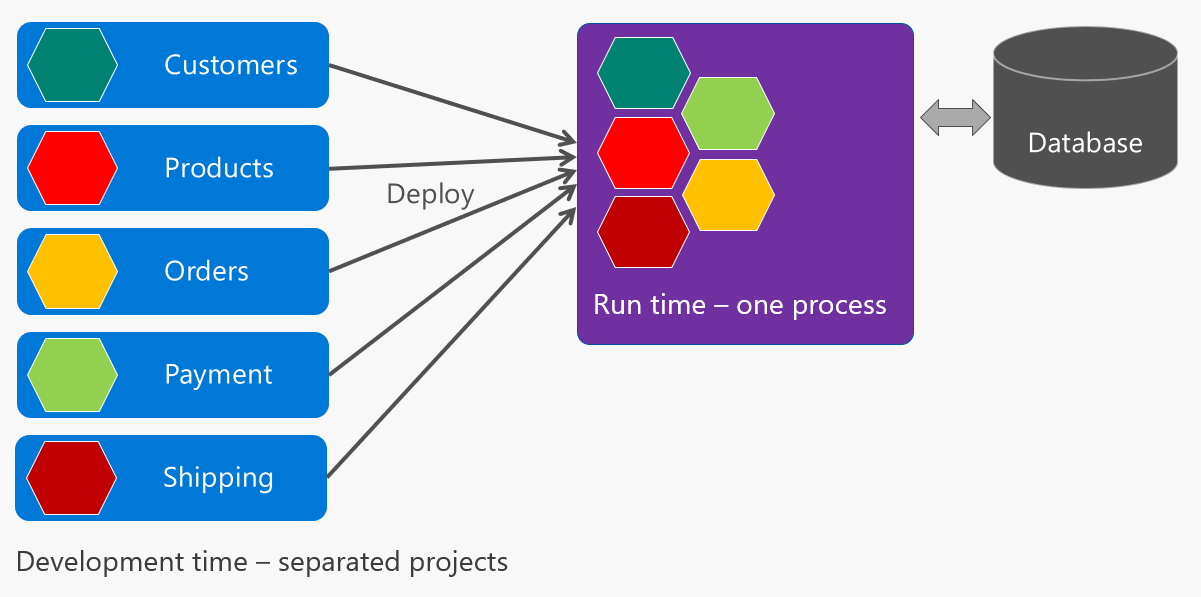
## Build Status
| Build server | Platform | Status |
|-----------------|----------------|-------------|
| Azure Pipelines | All |[](https://simplcommerce.visualstudio.com/simplcommerce/_build/latest?definitionId=1&branchName=master)
|Travis | Linux / MacOS |[](https://travis-ci.org/simplcommerce/SimplCommerce) |
## Online demo (Azure Website)
- Store front: http://demo.simplcommerce.com
- Administration: http://demo.simplcommerce.com/admin Email: admin@simplcommerce.com Password: 1qazZAQ!
## Docker
For testing purpose only `docker run -p 5000:80 simplcommerce/ci-build`
Continuous deployment: https://ci.simplcommerce.com
## Visual Studio 2022 and SQL Server
#### Prerequisites
- SQL Server
- Visual Studio 2022 and .NET 8
#### Steps to run
- Update the connection string: Open appsettings.json in src/SimplCommerce.WebHost.
The default is configured for a local SQL Server
```json
{
"DefaultConnection": "Server=.;Database=SimplCommerce;Trusted_Connection=True;TrustServerCertificate=true"
}
```
If you are using Visual Studio LocalDB, change it to
```json
{
"DefaultConnection": "Server=(localdb)\\mssqllocaldb;Database=SimplCommerce;Trusted_Connection=True;TrustServerCertificate=true;MultipleActiveResultSets=true"
}
```
- Ensure you have a database named `SimplCommerce` created in your SQL instance, or change the `Database` name in the connection string to match your environment.
- Build the whole solution.
- In Solution Explorer, make sure that SimplCommerce.WebHost is selected as the Startup Project
- Open the Package Manager Console Window and make sure that SimplCommerce.WebHost is selected as the Default project. Then type "Update-Database" then press "Enter". This action will create the database schema.
- In Visual Studio, press "Control + F5".
- The back-office can be accessed via /Admin using the following built-in account: admin@simplcommerce.com, 1qazZAQ!
## Mac/Linux with PostgreSQL
#### Prerequisite
- PostgreSQL
- [.NET Core SDK 8.0](https://www.microsoft.com/net/download/all)
- Entity Framework Core Tools (`dotnet tool install --global dotnet-ef`)
#### Steps to run
- Update the connection string in appsettings.json in SimplCommerce.WebHost.
- Run the simpl-build.sh file by issuing the following command: "sudo ./simpl-build.sh". For ubuntu 18: "sudo bash simpl-build.sh"
- In the terminal, navigate to "src/SimplCommerce.WebHost" and type "dotnet run" and then hit "Enter".
- Open http://localhost:49206 in the browser. The back-office can be accessed via /Admin using the following built-in account: admin@simplcommerce.com, 1qazZAQ!
## Technologies and frameworks used:
- ASP.NET Core
- Entity Framework Core
- ASP.NET Identity Core
- Angular 1.6.3
- MediatR 7.0.0 for domain event
## Docs
https://docs.simplcommerce.com/
## Roadmap
https://github.com/simplcommerce/SimplCommerce/wiki/Roadmap
## How to contribute
- Star this project on GitHub.
- Report bugs or suggest features by creating new issues or adding comments to issues
- Submit pull requests
- Spread the word by blogging about SimplCommerce or sharing it on social networks
- Donate to us
## Contributors
This project exists thanks to all the people who contribute.
<a href="https://github.com/simplcommerce/SimplCommerce/graphs/contributors"><img src="https://opencollective.com/simplcommerce/contributors.svg?width=890" title="contributors" alt="contributors" /></a>
## Backers
Love our work and help us continue our activities? [[Become a backer](https://opencollective.com/simplcommerce#backer)]
<a href="https://opencollective.com/simplcommerce#backers" target="_blank"><img src="https://opencollective.com/simplcommerce/backers.svg?width=890"></a>
## Sponsors
Become a sponsor and get your logo on our README on Github with a link to your site. [[Become a sponsor](https://opencollective.com/simplcommerce#sponsor)]
<a href="https://opencollective.com/simplcommerce/sponsor/0/website" target="_blank"><img src="https://opencollective.com/simplcommerce/sponsor/0/avatar.svg"></a>
<a href="https://opencollective.com/simplcommerce/sponsor/1/website" target="_blank"><img src="https://opencollective.com/simplcommerce/sponsor/1/avatar.svg"></a>
<a href="https://opencollective.com/simplcommerce/sponsor/2/website" target="_blank"><img src="https://opencollective.com/simplcommerce/sponsor/2/avatar.svg"></a>
<a href="https://opencollective.com/simplcommerce/sponsor/3/website" target="_blank"><img src="https://opencollective.com/simplcommerce/sponsor/3/avatar.svg"></a>
<a href="https://opencollective.com/simplcommerce/sponsor/4/website" target="_blank"><img src="https://opencollective.com/simplcommerce/sponsor/4/avatar.svg"></a>
## License
SimplCommerce is licensed under the Apache 2.0 license.
[](https://app.fossa.com/projects/git%2Bgithub.com%2Fsimplcommerce%2FSimplCommerce?ref=badge_large)